


Page 587 - 02. Subyek Computer Aided Design - Beginner’s Guide to SOLIDWORKS 2019- Level 1 by Alejandro Reyes
P. 587
Assembly Modeling


                                                      Exploded View


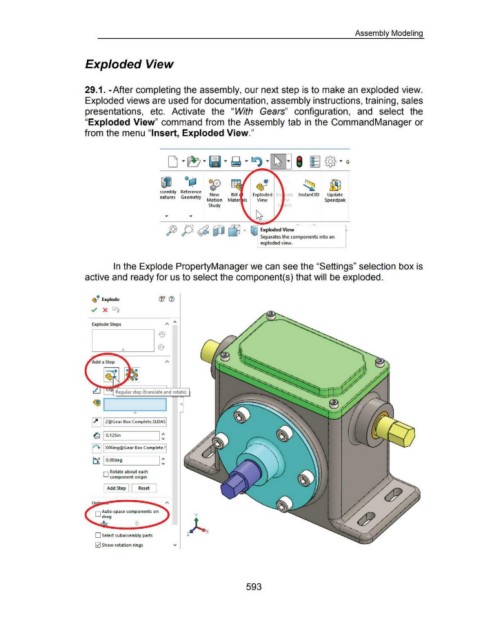
                                                      29.1. -After completing the assembly, our next step is to make an exploded view.


                                                      Exploded views are used for documentation, assembly instructions, training, sales


                                                      presentations,  etc.  Activate  the  "With  Gears"  configuration,  and  select  the


                                                      "Exploded View" command from the Assembly tab in  the CommandManager or


                                                      from the menu "Insert, Exploded View."


                                                                                                                    od;l           Ot;\                               It!


                                                                                                                                    €T
                                                                                                                         I                                       ~--!
                                                                                                     ssembly  Reference
                                                                                                                                    New                        Exploded                     lnstant3D         Update
                                                                                                     eatures  Geometry
                                                                                                                                  Motion  Mater  Is               View                                      Speedpak
                                                                                                                                   Study

                                                                                                                                                              I ~


                                                                                                     ------------------~
                                                                                                         fJ j)J ~ ~ Lj "'                                        :f Exploded View


                                                                                                                                                                    Separates the components into an
                                                                                                                                                                    exploded view.


                                                                        In the Explode PropertyManager we can see the "Settings" selection box is


                                                      active and ready for us to select the component(s) that will be exploded.


                                                             ~
                                                          G~··  Explode


                                                          ../  X  t.


                                                          Explode Steps


                                                                         Regular step (translate and rotate)


                                                          ~ I Z@Gear Box Complete.SLDASI


                                                           ~ I 0.125in                               I ~

                                                          II"). II XYRing@Gear Box Complete.~~


                                                                                                     I ~
                                                           ~ I O.OOdeg


                                                                 O Rotate about each
                                                                      component origin


                                                                    Add Step            Reset


                                                            0  Auto-space components on
                                                                 drag

                                                                ...;I;...


                                                            0  Select subassembly parts

                                                            0  Show rotation rings


                                                                                                                                                           593

