


Page 591 - 02. Subyek Computer Aided Design - Beginner’s Guide to SOLIDWORKS 2019- Level 1 by Alejandro Reyes
P. 591
Assembly Modeling


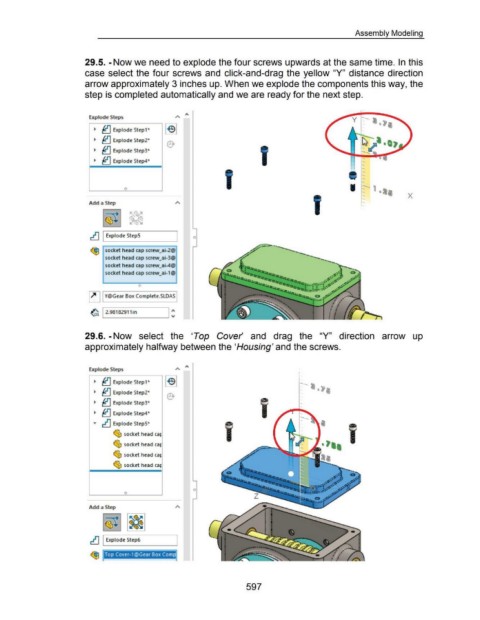
                                                      29.5. -Now we need to explode the four screws upwards at the same time. In this


                                                      case select the four screws and  click-and-drag  the yellow "Y"  distance direction


                                                      arrow approximately 3 inches up. When we explode the components this way, the


                                                      step is completed automatically and we are ready for the next step.


                                                         Explode Steps                                                                                                                                                       y  --:-


                                                            ~  ~ Explode Step1"


                                                            ~  ~ Explode Step2"


                                                            ~  ~ Explode Step3"


                                                            ~  ~ Explode Step4"


                                                                               0
                                                                                                                                                                                                                                                                X


                                                        Add a Step


                                                         ~ I Explode StepS                                                0


                                                          ~ socket head cap scre-w_ai-2@

                                                                   socket head cap screw_ai-3@

                                                                   socket head cap scre-w_ai-4@

                                                                   socket head cap screw_ai-1@


                                                                                       0
                                                        ~ I Y@Gear Box Complete.SLDAS I


                                                                                                          I:

                                                         ~ 12.98182911in


                                                      29.6. -Now  select  the  'Top  Cover'  and  drag  the  "Y"  direction  arrow  up


                                                      approximately halfway between the 'Housing' and the screws.


                                                         Explode Steps


                                                            ~  ~ Explode Step1*                                                                                                              --
                                                                                                                                                                                             ...

                                                            ~  ~ Explode Step2"


                                                            ~  ~ Explode Step3"
                                                                                                                                                                                             ...

                                                            ~  ~ Explode Step4"


                                                           ,..  ~ Explode StepS*

                                                                        ~ socket head ca~


                                                                        ~ socket head ca~                                                                                                                 • ••


                                                                        ~ socket head ca~


                                                                        ~ socket head ca~


                                                                                                                          0
                                                                               0


                                                        Add a Step


                                                         ~ I Explode Ste-p6


                                                                   Top Cover-1©Gear Box Com


                                                                                                                                                           597

