


Page 282 - Making PIC Microcontroller Instruments and Controllers
P. 282
PAiIEL
             2A2   BUILDII{G A SIIIIPLE  EIGHT.BUTTOII TOUCTI


                       The operation of a touch inteface is very similar to the scanning  of a keyboard
                     except  that the wires and switches  are replaced by infrar€d light beams  and, of course,
                     instead of making a contact  with a switch, we break  a light beam and detect  the eflect
                     on a phototransistor.  The problem is that light beams scailer  aid  can illuminate mole
                     than one detectot while the wires  go  1o one  button only. making  them easier to use This
                                                               to be successful.
                     means the scanning  hasto be more device-specifio       We need to turn  on
                     one  IR emitter at a time  and look al the one  phototransistor  opposite  it (ignodng  all
                     others).  You will more clearly  see what I mcan  by this as we  go  along
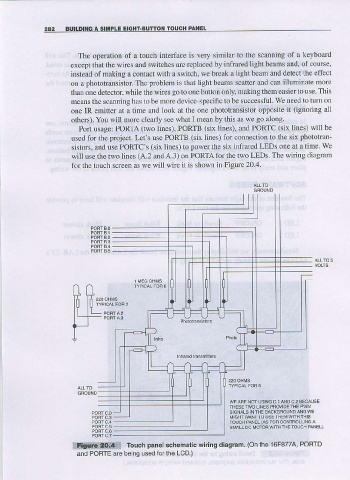
                       Port usage:  PORIA (two  linet,  PORTB  (six  lines), ard PORTC  (six  linet  will be
                     useal lor the  project.  Let's use  PORTB  (six  lines)  for connection to the six  phototran_
                     sistors, and use  PORTC'S  (six  linet  to  power  the six  infrafed LEDS one at  a time. Wc
                     will use the two  lines  (A.2  andA.3) on  PORTA lbr th.3 two  LEDS. The wiring  diagram
                     for the touch screen  as we will wire it is shown  in Figure  20.4.


                                                                                       A
                                                                rOUCH PANEL  lAS  FOF CONTBOLLINC
                                                                SMALL DC MOTOF  W fr  TNE TOUCH  PANEL)
                                                        wking ctiagram.  ihe 16F877A,
                     |tiatti€:?e{i1   Touch  panel  schemaiic        (on            PoRTD
                      and PORTE are being  used forlhe  LCD.)

