


Page 286 - Making PIC Microcontroller Instruments and Controllers
P. 286
BUILDII{G A SIi'PLE EIGHT.EUTTOI{ TOUCH PAIIEL


                    THE SOFTWARE
                    We will divide ihc software  into three independent modules:

                      Read $,hich oflhe eight  points  has been selected wilh getkey.
                    I Display the informalion on the LAB-XI  so we can see what is going on wilh
                      display.
                      React to the selected  key with do it.

                      Wc need to set up the scan roulinc to determine  which ofthe inliared beams  have
                    been intcnupted  so we can idenlily the arca ofthe LCD that has been selected.  The
                    scheme lbr doing so  is similar to the scheme uscd  in scanning  a keyboard. It con_
                    sists ofturning on the  LED for colulnn I and then cbeckjng  to see ifiightbeams lbr
                    the column have bccn  intenupted. We do this for each column one  at a time. If abeam
                    has  been  interrupled, thc line associated  with it will remain high.lfit  has not, we  go
                    on to the next line ard check it. We make a record of the selection  if a columl1 was

                      We  do the same thing lbr thc othcr  row and then  pass  the intbrmation  to the display
                    routinc. and then  the executiolrouline. The execution  routine uses the select  case state-
                    nent to choose the  rows and column and rcact tothem.  Aftef we illle done, we  resel the
                    row and column variables to 0 and start over,
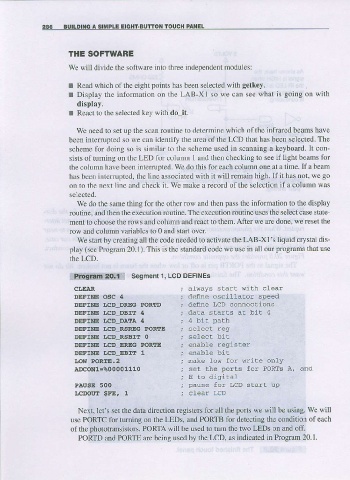
                      We starlby creatlng all  the code needed to aclivate the  LAB-Xl's liquidcrystal dis-
                    play (see  Program 20.1). This  is  the  standard code we use in all our  programs  that use
                    the  LCD.

                      program  2O.1  Segment  1. LCD DEFINES
                      CI,EAI                         aLways slart  {irh   clear
                      DEFXNE  OSC  4                 def,ne oscilLaior   speed
                      DEFTNE  LCD  DREG  PORTD       define  LCD connecLrons
                      DEFTNE  I,CD  DBIT   4         data  slarts   at  biL  4
                      DEFINE  I.CD  DATA  4
                      DEFINE   LCD  RSREG  PORTE
                      DEFINE  LCD_RSBIT  O
                      DEFINE   I,CD_EREG  PORIE      enable  register
                      DEFINE  LCD,EBIT   1
                      LO9,l POR[E.2                  nake  low  for  wriLe  only
                      AtcoNl=%00001110
                                                     E  to  diqrital
                      PAUSE  5OO                     pause  for  LcD  starr  up
                      I,CDOUE  $FE,  1

                       Ne)rt. let's set the data direction registers lbr all the  ports  we will  be using.  we wili
                     use PORTC tbr turning on the LEDS, and PORTB for detecting  the condition of each
                     of the photolransistors- PORTA will  be used |o 1um the two LEDS or and off.
                       PORTD and PORIE are being  used by the LCD, as indjcated  in Program 20.1.

