


Page 283 - Making PIC Microcontroller Instruments and Controllers
P. 283
PROJECi  6   240


                  BUILDII{G THE TOUCH PAIIEL FNA  E
                  No\r that we know what we need h  the way of hardware, let's build a simple touch
                  frame.  The  easiest  way  to do  this is to use a  Fefabricated  rc  board  with lines on the
                  back. and lhencul out lhe  parls you  need lo fit.Aseemb,e
                                                                  the frame with  lhe solderside
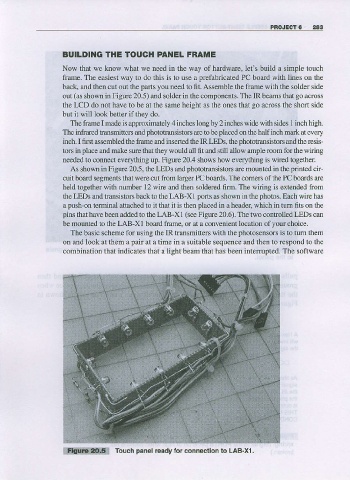
                  out  (as  shown in Figue 20.5) and solder in lhe components. The IR beams that  go  aqoss
                  the LCD do not have to be at the same height as the ones that  go  aooss the short side
                  bul it will look better if they do.
                    The frame made is approxhEtely 4 iDches long by 2 inches wide widr sides  1  inch high.
                             I
                  Tbe in foared t-ansmiflers and  photoo?nsistors
                                                      ale !o be  placed  on the half inch mark at every
                                                                                and
                  inch.  I first assembled lhe  frame  and  inserted  the  IR LEDS.  lhe ohototransistors the resis-
                  tors in  place  and make sure thal $ey  would  aU ftl and sti  ll allow ample  room for the $ iri ng
                  ne€ded to connect everything up. Figure 20.4 shows how ever''thing is wired together.
                    As shown in Figue 20.5, the LEDS and  phototra$istors  are mounted in the  pnnted  cir-
                  cuit board segments that were cut ftom larger PC boards. The comen of the PC boards are
                  held together with number l2 wie and then solder€d 6Im. The widng is extended ftom
                  the LEDS aDd trarrsistors back to the LAB-XI porls  as showD in the  photos.  Each wire has
                  a  push-on  terminal attached to it that it is then  placed  in a header, which in tum fits on the
                  pins  that have beer added to tle LAB-XI (se€  Figure 20.6). The two controlled LEDS can
                  be  mount€d  to the LAB-X I board ftamq or at a convenient  location  of your  choice.
                    The basic scheme for using the IR transmitters with the  photosensors
                                                                              is to turn  them
                  on and look at them a  pair  at a time in a suitable sequence and then ro respond to tho
                  combination that indicates that a light bearn that has been interupted. The software


                  W              Touch  panel  ready lor connectlon lo LAB-xl .

