


Page 357 - Mastering SolidWorks
P. 357
|
        330   CHAPTER 10  USIng EqUATIOnS


                    Linking to External Equations
                    You can use externally saved equations to share equations between models. To export an
                    equation, click the Export button on the right side of the Equations dialog box, as shown in
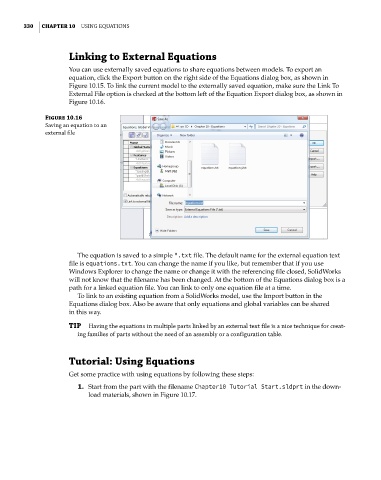
                    Figure 10.15. To link the current model to the externally saved equation, make sure the Link To
                    External File option is checked at the bottom left of the Equation Export dialog box, as shown in
                    Figure 10.16.

              Figure 10.16
              Saving an equation to an
              external file


                       The equation is saved to a simple *.txt file. The default name for the external equation text
                    file is equations.txt. You can change the name if you like, but remember that if you use
                    Windows Explorer to change the name or change it with the referencing file closed, SolidWorks
                    will not know that the filename has been changed. At the bottom of the Equations dialog box is a
                    path for a linked equation file. You can link to only one equation file at a time.
                       To link to an existing equation from a SolidWorks model, use the Import button in the
                    Equations dialog box. Also be aware that only equations and global variables can be shared
                    in this way.
                    TIP  Having the equations in multiple parts linked by an external text file is a nice technique for creat-
                       ing families of parts without the need of an assembly or a configuration table.


                    Tutorial: Using Equations
                    Get some practice with using equations by following these steps:
                       1.  Start from the part with the filename Chapter10 Tutorial Start.sldprt in the down-
                          load materials, shown in Figure 10.17.

