


Page 163 - Process simulation and control using Aspen
P. 163
150      PROCESS SIMULATION AND CONTROL USING ASPEN
              Four steam streams used in the column model are described in Table 3.5.

                                                TABLE 3.5
                                                              Speciications                    1
                                                                  f
            Steam stream    Location      Temperature (0F)   Pressure (psia)  Flow rate (lb/h r)
              STEAM       Main tower            350                50              11500
              STM1        SID1 stripper         350                50               4000
              STM2        SID2 stripper         350                50               1500
              STM3        SID3 stripper         350                50               1000

              Considering the 'BK10' base method under 'REFINERT process type, simulate the
          PetroFrac column and report the flow rates (bbl/day) of all product streams.

          Simulation approach

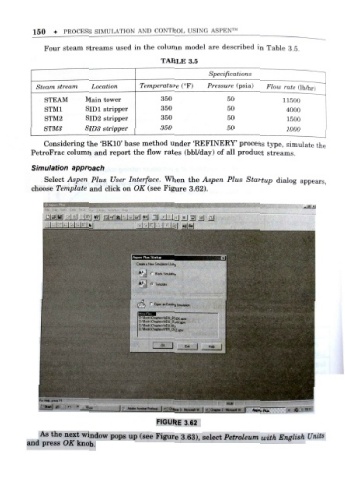
              Select Aspen Plus User Interface. When the Aspen Plus Startup dialog appears ,
          choose Template and click on OK (see Figure 3.62).


                I  I  I  I  I  I  It


                                         Cioata a Utm SmMan Using
                                         A+
                                             f  Blank Smiiabon
                                         A+
                                              Temptale

                                             "
                                              OpendnEwiingSimulatior
                                               e*r\ADU BOOK apw
                                         DAeoolAChaptesVAOU OWN xm
                                         D:V0ook\Chap(«sViDU .t*{>

                                                   I
                                                0«


                                    |  Adobe Ao-dia P,d«»« I Chace.s  W \ 4]Q*i** 2 HmcHW ||  Av  Pka

                                              FIGURE 3.62
             As the next window pops u  p (see Figure 3.63), select Petroleum with English Units
         and press OK knob .

