


Page 160 - Basics of MATLAB and Beyond
P. 160
controlled by guide and which are active (meaning that the uicontrols
                               are no longer moveable by guide). The buttons at the bottom of the
                               control panel allow you to select different uicontrols and then draw them
                               on the figure with the mouse. Clicking on the button with the picture of
                               a cursor arrow on it allows you to select objects in the controlled figure.
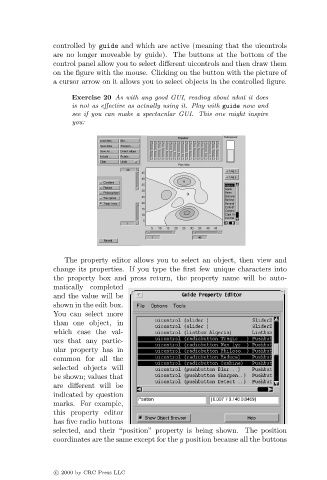
                                    Exercise 20 As with any good GUI, reading about what it does
                                    is not as effective as actually using it. Play with guide now and
                                    see if you can make a spectacular GUI. This one might inspire
                                    you:


                                  The property editor allows you to select an object, then view and
                               change its properties. If you type the first few unique characters into
                               the property box and press return, the property name will be auto-
                               matically completed
                               and the value will be
                               shown in the edit box.
                               You can select more
                               than one object, in
                               which case the val-
                               ues that any partic-
                               ular property has in
                               common for all the
                               selected objects will
                               be shown; values that
                               are different will be
                               indicated by question
                               marks. For example,
                               this property editor
                               has five radio buttons
                               selected, and their “position” property is being shown. The position
                               coordinates are the same except for the y position because all the buttons


                               c   2000 by CRC Press LLC

