


Page 647 - 02. Subyek Computer Aided Design - Beginner’s Guide to SOLIDWORKS 2019- Level 1 by Alejandro Reyes
P. 647
Animation and Rendering


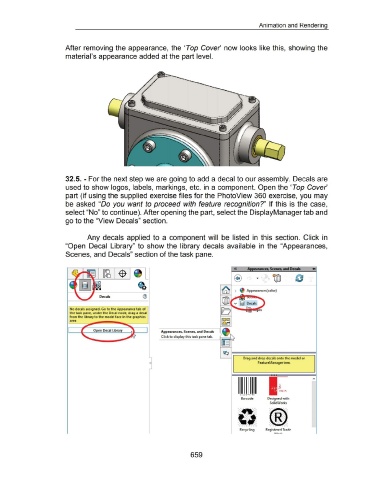
                                                      After removing the appearance, the 'Top Cover'  now looks like this,  showing the


                                                      material's appearance added at the part level.


                                                      32.5. - For the next step we are going to add a decal to our assembly. Decals are


                                                      used to show logos, labels, markings, etc. in  a component. Open the 'Top Cover'


                                                      part (if using the supplied exercise files for the Photo View 360 exercise, you may


                                                      be  asked "Do you want to proceed with  feature  recognition?"  If this  is the case,


                                                      select "No" to continue). After opening the part, select the DisplayManager tab and


                                                      go to the "View Decals" section.


                                                                        Any decals applied  to  a  component will  be  listed  in  this section.  Click  in


                                                      "Open  Decal  Library"  to  show the  library decals available  in  the  "Appearances,


                                                      Scenes, and Decals" section of the task pane.


                                                                                                                                                                                              «          Appewrances. Scenes. ...t Decals


                                                                                                                                                                                                        Appearances( color)

                                                                                                                   -
                                                                                 Decals


                                                          No decals assigned. Go to the Appearance tab of
                                                         the task pane, under the Decal node, drag a decal
                                                         from the library to the model face in the graphics
                                                          area


                                                                            Open Decal library                                     Appearances, Scenes, and Decals

                                                                                                                                   Click to display this task pane tab.


                                                                                                                                                                                                      Drag and drop decals onto the model or
                                                                                                                                                                                                                 FeatureManager tree.


                                                                                                                                                                                                    Barcode              Designed with

                                                                                                                                                                                                                           SolidWorks


                                                                                                                                                                                                   Recycling            Registered Trade
                                                                                                                                                                                                                               • A--•·


                                                                                                                                                           659

