


Page 652 - 02. Subyek Computer Aided Design - Beginner’s Guide to SOLIDWORKS 2019- Level 1 by Alejandro Reyes
P. 652
Animation and Rendering


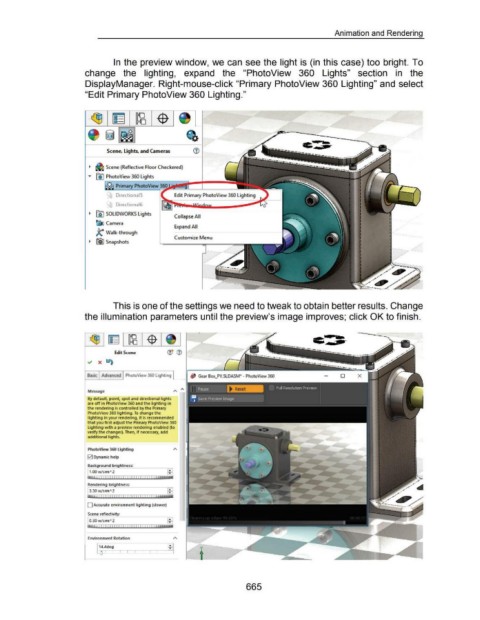
                                                                        In the preview window, we can see the light is (in this case) too bright. To


                                                      change  the  lighting,  expand  the  "PhotoView  360  Lights"  section  in  the


                                                      DisplayManager. Right-mouse-click "Primary PhotoView 360 Lighting" and select


                                                      "Edit Primary PhotoView 360 Lighting."


                                                                                                                                                                              ~ZJ~r.>.·-----------.
                                                                                                                                                                                                             --


                                                                    Scene, Lights, and Cameras


                                                        ~  & Scene (Reflective Floor Checkered)


                                                        ..,..  fO)  PhotoView 360 lights


                                                                         Primary PhotoView ~--.....


                                                                      '  DirectionaiS
                                                                     '
                                                                    ~ Directiona16


                                                        .,  @] SOLIDWORKS lights
                                                                                                              Collapse All
                                                             ~ Camera
                                                                                                              Expand All
                                                             k  Walk-through
                                                                                                              Customize Menu
                                                        .,  rril Snapshots


                                                                        This is one of the settings we need to tweak to obtain better results. Change


                                                      the illumination parameters until the preview's image improves; click OK to finish.


                                                                        Edit Scene


                                                        Basic  Advanced  PhotoView 360 Lighting
                                                                                                             '--


                                                        Message

                                                        By default, point, spot and directional lights
                                                        are off in Photo View 360 and the lighting in
                                                        the rendering is  controlled by the Primary
                                                        Photo  View 360 lighting. To  change the
                                                        lighting in your rendering, it is recommended
                                                        that you first adjust the Primary PhotoView 360
                                                        lighting with a preview rendering enabled (to
                                                        verify the changes). Then, if necessary, add
                                                        additional lights.


                                                        PhotoV"eew 360 lighting

                                                        0  Dynamic help

                                                        Background brightness:

                                                         1.00 w/ srm" 2


                                                        0 Accurate environment lighting (slower)

                                                        Scene reflectivity:

                                                        [o.30 w/srm" 2


                                                        Environment Rotation


                                                                                                                                                           665

