


Page 649 - 02. Subyek Computer Aided Design - Beginner’s Guide to SOLIDWORKS 2019- Level 1 by Alejandro Reyes
P. 649
Beginner's Guide to SOLIDWORKS 2019- Level I


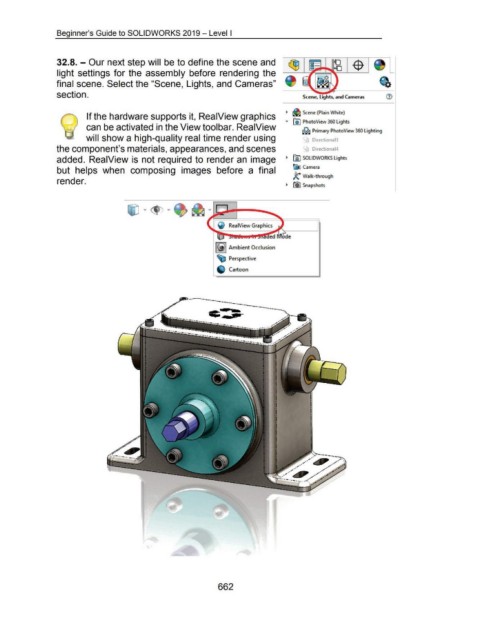
                                    32.8.- Our next step will be to define the scene and


                                    light settings for the  assembly  before  rendering  the


                                    final scene. Select the "Scene, Lights, and Cameras"


                                    section.                                                                                                                                                  Scene, Lights, and Cameras


                                                                                                                                                                                    ~  ~ Scene (Plain White)
                                                       If the hardware supports it, ReaiView graphics

                                                                                                                                                                                   .....  00 PhotoView 360 Lights
                                                       can be activated in the View toolbar. ReaiView
                                                                                                                                                                                              ~ Primary PhotoView 360 Lighting

                                                       will show a high-quality real time render using                                                                                              Directional3


                                    the component's materials, appearances, and scenes                                                                                                         !"'\  Directional4


                                    added.  ReaiView is not required to render an  image                                                                                            ~  @j SOLIDWORKS Lights

                                                                                                                                                                                        ~ Camera
                                    but  helps  when  composing  images  before  a  final

                                                                                                                                                                                        ~ Walk-through
                                    render.
                                                                                                                                                                                    ~  rtiJ Snapshots


                                                                                                                                                ReaiView Graphics


                                                                                                                                        I @)I Ambient Occlusion


                                                                                                                                        ~ Perspective


                                                                                                                                                Cartoon


                                                                                                                                         662

