Page 653 - 02. Subyek Computer Aided Design - Beginner’s Guide to SOLIDWORKS 2019- Level 1 by Alejandro Reyes
P. 653
Beginner's Guide to SOLIDWORKS 2019- Level I


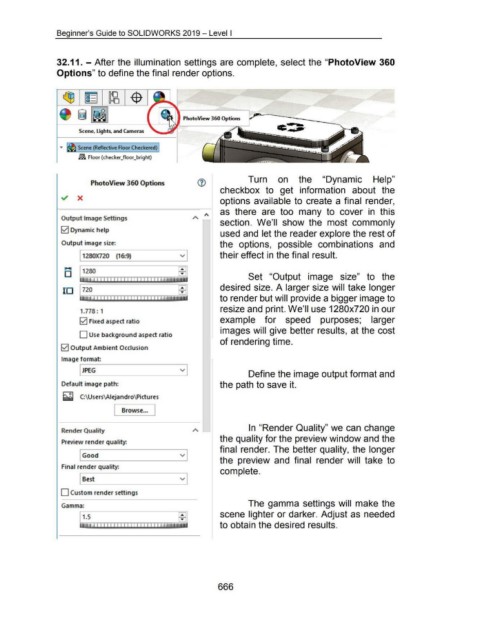
                                    32.11. - After the illumination settings are complete, select the  "PhotoView 360


                                    Options" to define the final render options.


                                                                                                                    PhotoView 360 Options  ,~-·--~===-----._


                                                                                                                                                                              c.•-T
                                                  Scene, Lights, and Cameras


                                      ...         Scene (Reflective Floor Checkered)


                                                  ~ Floor (checker_floor_bright)


                                                                                                                                                            Turn  on  the  "Dynamic  Help"
                                                          PhotoView 360 Options

                                                                                                                                           checkbox  to  get  information  about  the

                                       -./  X
                                                                                                                                           options available to  create a final  render,


                                                                                                                                           as  there  are  too  many  to  cover  in  this

                                       Output Image Settings
                                                                                                                                          section.  We'll  show  the  most  commonly

                                       0  Dynamic help
                                                                                                                                           used and let the reader explore the rest of


                                       Output image size:                                                                                  the  options,  possible  combinations  and


                                                    1280)(720  (16:9)                                            v                         their effect in the final result.

                                         .....


                                         D          1280                                                                                                    Set  "Output  image  size"  to  the


                                                                                                                                           desired size. A larger size will take longer
                                        10  720
                                                                                                                                           to render but will provide a bigger image to


                                                                                                                                           resize and print. We'll use 1280x720 in our
                                                   1.778 : 1


                                                   0  Fixed aspect ratio                                                                   example  for  speed  purposes;  larger

                                                                                                                                           images will give better results,  at the cost
                                                   D Use background aspect ratio
                                                                                                                                          of rendering time.

                                       0  Output Ambient Occlusion


                                       Image format:


                                                    JPEG                                                         v
                                                                                                                                                            Define the image output format and


                                       Default image path:                                                                                 the path to save it.


                                        t::Ol
                                        _,  C:\Users\Aiejandro\ Pictures


                                                                        l  Browse ... J


                                                                                                                                                            In "Render Quality" we can change
                                       Render Quality
                                                                                                                                           the quality for the preview window and the
                                       Preview render quality:
                                                                                                                                          final  render. The better quality, the longer

                                                    Good                                                         v
                                                                                                                                           the  preview  and  final  render  will  take  to

                                       Final render quality:
                                                                                                                                           complete.

                                                    Best                                                         v


                                       D Custom render settings


                                                                                                                                                            The gamma settings will  make the
                                       Gamma:

                                                                                                                                          scene lighter or darker. Adjust as needed


                                                                                                                                           to obtain the desired results.


                                                                                                                                         666
   648   649   650   651   652   653   654   655   656   657   658