


Page 655 - 02. Subyek Computer Aided Design - Beginner’s Guide to SOLIDWORKS 2019- Level 1 by Alejandro Reyes
P. 655
Beginner's Guide to SOLIDWORKS 2019- Level I


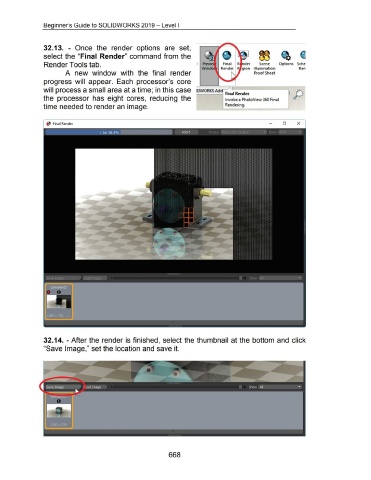
                                    32.13.  - Once  the  render  options  are  set,


                                    select the "Final  Render" command from the


                                     Render Tools tab.                                                                                                         •  Previ              Final                        Scene           Options  Sche

                                                                                                                                                                    Win do                                    Illumination                        Ren
                                                      A  new  window  with  the  final  render                                                                                                                Proof Sheet


                                    progress  will  appear.  Each  processor's  core


                                    will process a small area at a time; in this case  IDWORKS Add  ·F.  I R  nd
                                                                                                                                                                                         ma  e         er                                     JjJ
                                    the  processor  has  eight  cores,  reducing  the                                                                                                  Invoke a PhotoView 360 Final


                                    time needed to render an image.                                                                                                                    Rendering.


                                            Final Render                                                                                                                                                                             0           X


                                    32.14.  - After the render is finished,  select the thumbnail  at the bottom and click


                                    "Save Image," set the location and save it.


                                                                                                                                         668

