


Page 659 - 02. Subyek Computer Aided Design - Beginner’s Guide to SOLIDWORKS 2019- Level 1 by Alejandro Reyes
P. 659
Beginner's Guide to SOLIDWORKS 2019- Level I
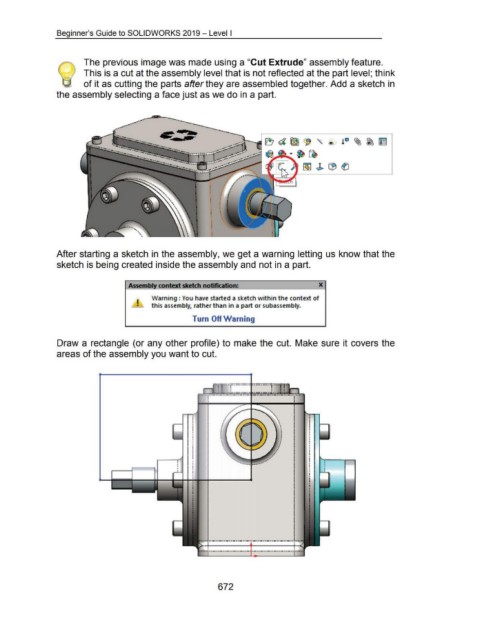
The previous image was made using a "Cut Extrude" assembly feature.
) This is a cut at the assembly level that is not reflected at the part level; think
of it as cutting the parts after they are assembled together. Add a sketch in
the assembly selecting a face just as we do in a part.
~ d ~ ~ " ® !" ~ ~ ~
La
~ ~ l:B~
I •
•
I •,
•
I
After starting a sketch in the assembly, we get a warning letting us know that the
sketch is being created inside the assembly and not in a part.
Assemi»>J context sketch notification: ______ _ X
\Naming : You have started a sketch within the context of
this assembly, rather than in a part or subassembly.
Turn Off Warning
Draw a rectangle (or any other profile) to make the cut. Make sure it covers the
areas of the assembly you want to cut.
I
.. ., I
... ··· ~- ·· ... ,
.. '
,' '\,
,; ' .. •
.
•
.
.
•
. •
•
• .
• •
• •
•
• .
• •
• •
• •
• . •
•
• ,. •
•
...
..
. , •
.... .. .. -····"'
. -··-··-. ·-·· -·. -··-··-.. -··-··-··-··
672

