


Page 660 - 02. Subyek Computer Aided Design - Beginner’s Guide to SOLIDWORKS 2019- Level 1 by Alejandro Reyes
P. 660
Animation and Rendering


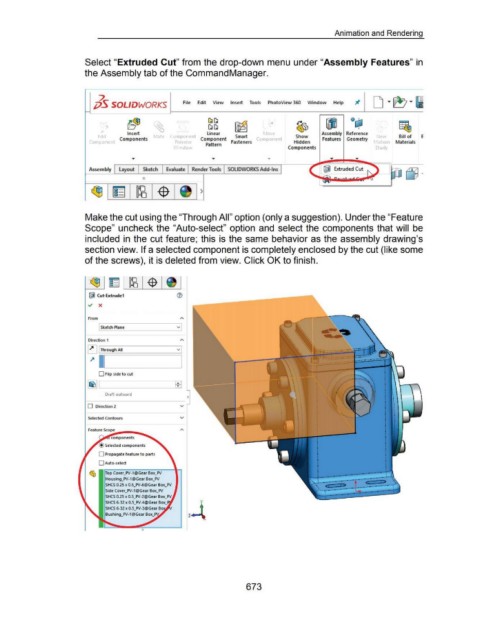
                                                      Select "Extruded Cut" from the drop-down menu under "Assembly Features" in


                                                      the Assembly tab of the Command Manager.


                                                              2                                                                                                                                                                           D T ~ T 61

                                                            jj5 SOLIDWORKS                                         File      Edit     View       Insert  Tools           PhotoView 360  Window                    Help


                                                                                 b~              ~                                 ~~               ~                   ..:.t             ~                  ~              Qcj;l                          f!&,
                                                                                                                                   ~~
                                                                                                                                                                                                                                 I
                                                                                Insert                                            linear                             r o  e                               Assembly  Reference
                                                              Ed1t          Components              ate  Componer             Component             Smart          omponen                Show             Features  Geometry                Ne            Bill of      E
                                                         Componer                                             Pre  1e             Pattern        Fasteners                               Hidden                                             lot1or      Materials

                                                                                                             \  mdo                                                                  Components                                             Study


                                                         Assembly          Layout         Sketch         Evaluate        Render Tools  SOLIDWORKS Add-Ins                                                  IWJ  Extruded Cut


                                                                                          0


                                                                                                                              )


                                                      Make the cut using the "Through All" option (only a suggestion). Under the "Feature


                                                      Scope" uncheck the "Auto-select" option  and  select the components that will  be


                                                      included  in  the cut feature; this is the same behavior as the assembly drawing's


                                                      section view. If a selected component is completely enclosed by the cut (like some


                                                      of the screws), it is deleted from view. Click OK to finish.


                                                        iJ Cut-Extrude1

                                                        ~  X


                                                        From

                                                               [ Sketch Plane                                   v


                                                        Direction 1


                                                        ~ [ Through All                                         v


                                                         ~ l .___l __ ______,


                                                               0  Flip side to cut


                                                                   Draft outward


                                                        0  Direction 2                                           v


                                                        Selected Contours                                        v


                                                        Feature Sco~pe-....-..... ........_

                                                                      components

                                                                   Selected components

                                                               0  Propagate feature to parts

                                                               0  Auto-select


                                                         ~  Top Cover_PV-1 @Gear Box_PV

                                                                   Housing_PV-1@Gear Box_PV
                                                                   SHCS 0.25 x 0.5_PV-6@Gear Box_PV
                                                                   Side Cover_PV-1 @Gear Box_PV

                                                                   SHCS 0.25 x 0.5_PV-2@Gear Box_PV
                                                                                                                              y
                                                                   SHCS 6-32 x 0.5_PV-4@Gear
                                                                                                                       z-t

                                                                   Bushing_PV-1 @Gear


                                                                                                                                                           673

