Page 661 - 02. Subyek Computer Aided Design - Beginner’s Guide to SOLIDWORKS 2019- Level 1 by Alejandro Reyes
P. 661
Beginner's Guide to SOLIDWORKS 2019- Level I


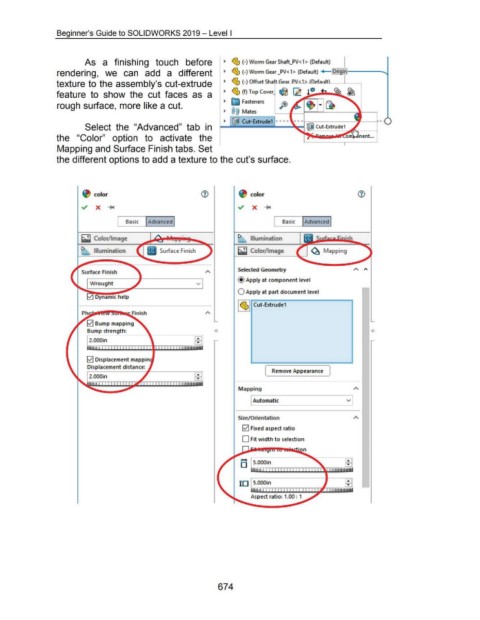
                                                      As  a  finishing  touch  before                                                        ~  ~ (-)Worm Gear Shaft_PV< 1> (Default)


                                    rendering,  we  can  add  a  different                                                                   ~  ~ (-)Worm Gear _PV<1> (Default)  +4-

                                                                                                                                             ~  ~ (-) Offset Sh  I,L-LlJr;:G.I_~..&.e:.....Ju...u:A.D..LU.l."-------l..---.
                                    texture to the assembly's cut-extrude


                                    feature  to  show  the  cut  faces  as  a                                                                ~  ~ (f) Top Cover

                                                                                                                                             ~  ~ Fasteners
                                    rough surface, more like a cut.
                                                                                                                                             ~  @@  Mates


                                                                                                                                                        Cut-Extrude1 --- -
                                                      Select  the  "Advanced"  tab  in                                                                                                                Cut-Extrude1


                                    the  "Color"  option  to  activate  the


                                    Mapping and Surface Finish tabs. Set


                                    the different options to add a texture to the cut's surface.


                                                            color                                                                                             color


                                                                                                                                                               X  ......


                                                                                Basic  I Advanced I                                                                               Basic  I Advanced I


                                                    ~ Color/ Image                                                                                            Illumination


                                                    I>      Illumination                                                                              ~ Color/ Image                               ~ Mapping


                                                                                                                                                      Selected GeometJy
                                                    Surface Finish
                                                                                                                                                      @Apply at component level
                                                         Wrought                                                            v

                                                                                                                                                      0  Apply at part document level


                                                                                                                                                      I ~~  Cut-Extrude1


                                                       0  Bump mapping
                                                       Bump strength:                                                                  0


                                                         2.000in


                                                       0  Displacement map pin

                                                       Displacement distance:
                                                                                                                            ...                                        (  Remove Appearance  }
                                                         2.000in


                                                                                                                                                      Mapping


                                                                                                                                                               Automatic                                                  v


                                                                                                                                                      Size/Orientation


                                                                                                                                                        0  Fixed aspect ratio


                                                                                                                                                        D Fit width to selection


                                                                                                                                                        .....

                                                                                                                                                       D


                                                                                                                                                       ID


                                                                                                                                                              Aspect ratio: 1.00 : 1


                                                                                                                                         674
   656   657   658   659   660   661   662   663   664   665   666