


Page 665 - 02. Subyek Computer Aided Design - Beginner’s Guide to SOLIDWORKS 2019- Level 1 by Alejandro Reyes
P. 665
Beginner's Guide to SOLIDWORKS 2019- Level I


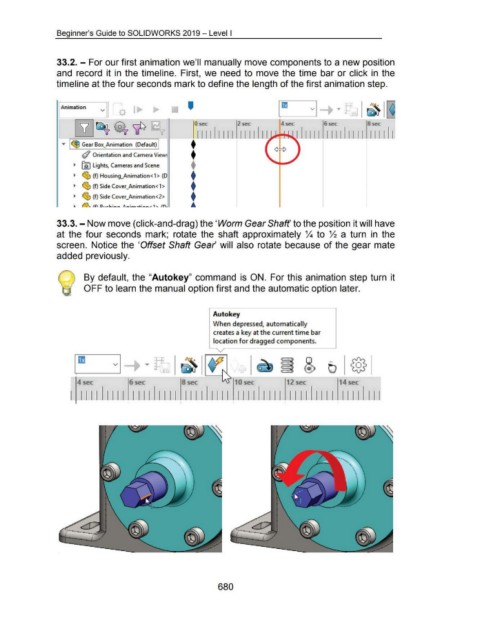
                                    33.2. - For our first animation we'll manually move components to a new position


                                    and  record  it in  the timeline.  First,  we  need to move the time  bar or click in  the


                                    timeline at the four seconds mark to define the length of the first animation step.


                                                                                                                      '
                                     I Animation
                                                                v


                                                                                                                           0 sec                     2 sec                       4 sec                      6 sec                      8 sec


                                                                                                                            111111111  I I I I
                                        ...,.  I ~ Gear Box_.;Animation  (Default) I                           - +:                                                        ~ 111111  1111  1111  1111


                                                    #  Orientation and Camera View!                                     t


                                               ~  ~ lights, Cameras and Scene                                           +


                                               ~  ~ (f) Housing_Animation< 1 > (D                                       t

                                                                                                                        t
                                               ~  ~ (f) Side Cover_Animation<1>


                                               ~  ~ (f) Side Cover_Animation<2>                                         t
                                                                                                                        ...


                                    33.3.- Now move (click-and-drag) the 'Worm Gear Shaft' to the position it will have


                                    at the  four seconds  mark;  rotate  the  shaft  approximately %  to  ~ a  turn  in  the


                                    screen.  Notice the  'Offset Shaft Gear will  also rotate  because of the gear mate


                                    added previously.


                                                     By default,  the "Autokey"  command  is  ON.  For this animation step turn  it


                                                     OFF to learn the manual option first and the automatic option later.


                                                                                                                                   !Auto key


                                                                                                                                      When depressed, automatically

                                                                                                                                      creates a key at the current time bar

                                                                                                                                      location for dragged components.


                                                                       v


                                                 4sec                             6sec                             8sec                             10sec                           12 sec                           14sec


                                                   1111             1111  1111  1111  1111  1111                                                      1111  1111  1111  1111  1111                                                      Ill
                                                                                 I                                I                                I                               I                                I


                                                                                                                                         680

