Page 668 - 02. Subyek Computer Aided Design - Beginner’s Guide to SOLIDWORKS 2019- Level 1 by Alejandro Reyes
P. 668
Animation and Rendering


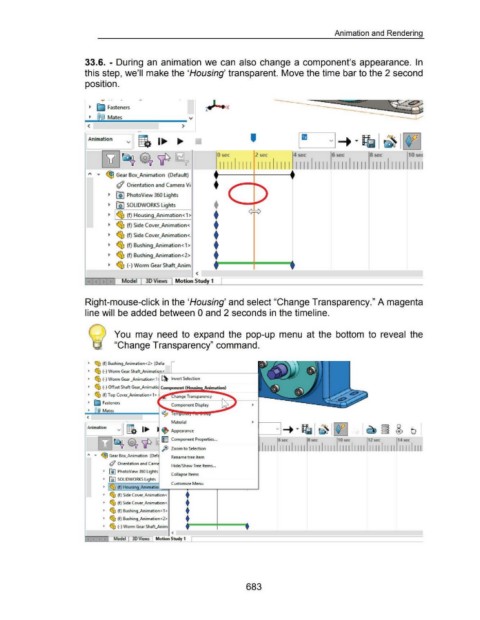
                                                      33.6. - During  an  animation we can  also change  a component's appearance.  In


                                                      this step, we'll  make the 'Housing' transparent. Move the time bar to the 2 second


                                                      position.


                                                                -- . .

                                                         ~  ~ Fasteners                                                           ~-X


                                                                    Mates                                              ....
                                                               ~-------------------- T
                                                                                                                  >


                                                                                v  it I~                                   •                                  '
                                                       I'Animation


                                                                 ~~ ~~'IP                                                  ~:-11 II_ _Il l L _Il l I_ _I II I_ _I Il l~ J I II __ II II_ J I II_ :-Ill I J II I_ _I I U
                                                                                                                                                                                        4sec
                                                                                                                                                                                                                 6sec
                                                                                                                                                                                                                                        8sec
                                                                                                                                                                 2 sec
                                                                                                                                         0 sec
                                                                                                                                                                                                                                                                10 se4

                                                                   ~ Gear Box_Animation  (Default)

                                                                         (/ Orientation and Camera Vi                                 :


                                                                     ~  II) PhotoView 360 Lights                                                r  1
                                                                                                                                       t  ~  A ~

                                                                     ~  jiD SOLIDWORKS Lights

                                                                                                                                       .&                   <      >
                                                                     ~  I ~ (f) Housing_Animation< 1 >                                 ...                   v    v

                                                                                                                                       t
                                                                     ~  ~ (f) Side Cover_Animation<

                                                                                                                                       t
                                                                     ~  ~ (f) Side Cover_Animation<.

                                                                                                                                       t
                                                                     ~  ~ (f) Bushing_Animation< 1 >

                                                                                                                                       ;~~~=il
                                                                     ~  ~ (f) Bushing_Animation<2>


                                                                     ~  ~ (-)Worm Gear Shaft_Anim
                                                       ----
                                                                                                                           < '

                                                                   Jl  .I  Model            3D Views  I Motion Study 1  I


                                                      Right-mouse-click in the 'Housing' and select "Change Transparency." A magenta


                                                      line will be added between 0 and 2 seconds in the timeline.


                                                                        You  may  need  to  expand  the  pop-up  menu  at the  bottom  to  reveal  the


                                                                        "Change Transparency" command.


                                                        ~  ~ (f) Bushing_Animation<2> (Defa•

                                                        ~  ~ (-)Worm Gear Shaft_Animati_<'-'-'---'------------

                                                        ~  ~ (-)Worm Gear _Animation<1

                                                        ~  ~ (-)Offset Shaft Gear_Animati

                                                        ~  ~ (f) Top Cover_Animation<1>                        ange Transparency

                                                        ~  ~ Fasteners

                                                        ~        Mates
                                                       <
                                                                                                            Material

                                                       r;:;;mation        v  g.  1 .....
                                                                                                      ~ Appearance

                                                              [SZJ~ €~ 'IF                            1:  j  Component Prope.rties ...


                                                                                                      ~ Zoom to Select.ion                                                                                                                                              I

                                                       "    T   ~ Gear Box_Animation  (Def                  Rename tree item

                                                                     (/ Orientation and Cam
                                                                                                            Hide/Show Tree Items  ...
                                                                 ~  [0) PhotoView 360 Lights
                                                                                                            Collapse Items
                                                                 ~  @) SOLIDWORKS Lights
                                                                                                            Customize Menu
                                                                 ~        (f)

                                                                 ~  ~ (f) Side Cover_Animation<                      •

                                                                 ~  ~ (f) Side Cover_Animati                         •

                                                                 ~  ~ (f) Bushing_Animation<1>                       •

                                                                 ~  ~ (f) Bushing_Animation<2>                       •

                                                                 ~  ~ (·)Worm Gear Shaft_Anim                          :=====F====:
                                                      ·~---                                                                                                 ----~--~---~---~---~--~
                                                                                                            <
                                                                        Model       3D Views      Motion Study 1


                                                                                                                                                           683
   663   664   665   666   667   668   669   670   671   672   673