


Page 672 - 02. Subyek Computer Aided Design - Beginner’s Guide to SOLIDWORKS 2019- Level 1 by Alejandro Reyes
P. 672
Animation and Rendering
!'Animation
0 sec 2 sec 4 sec 6sec 8sec
I I I I I I I I I I I I I I I I I I I I I I I I I I I I I I I I I I I I
~ 00 Mates in Gear Box_Ani
~ ~ (f) Side Cover_Animation< +
~ ~ (f) Side Cover_Animation<. +
~ ~ (f) Bushing_Animation < 1 > +
~ ~ (f) Bushing_Animation<2> +
~ ~ (-)Worm Gear Shaft_Anim
~ ~ (-) Worm Gear _Animation
~ ~ (-) Offset Shaft Gear_Anim;
~ ~ (f) Top Cover_Animation<'
~ ~ Fasteners
~ @@ Mates
<
Model 30 Views Motion Study 1
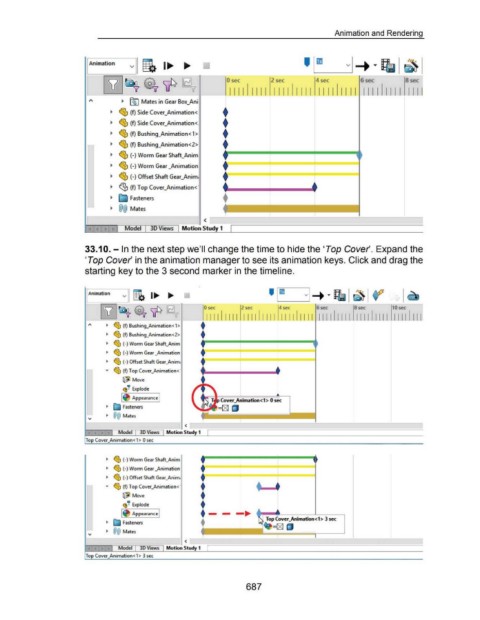
33.1 0. - In the next step we'll change the time to hide the 'Top Cover'. Expand the
'Top Cover' in the animation manager to see its animation keys. Click and drag the
starting key to the 3 second marker in the timeline .
., ~ (f) Bushing_Animation < 1 >
., ~ (f) Bushing_Animation<2>
., ~ (-) Worm Gear Shaft_Anim
., ~ (-) Worm Gear _Animation
., ~ (-) Offset Shaft Gear_Anim;
+
... ~ (f) Top Cover_Animation< '
@.il Move
~
(!·· Explode
I Appearance I ...
l Cover_Animation<1 > 0 sec
., ~ Fasteners =(g) LJ
., @@ Mates ~--------~--~
<
Model 30 Views Motion Study 1
Top Cover_Animation<1> 0 sec
., ~ (-)Worm Gear Shaft_Anim
t
., ~ (-) Worm Gear _Animation
rfi:l.. t __ _j____ _ _____L____ __
., '.:tJ (-) Offset Shaft Gear_Anim;
... ~ (f) Top Cover_Animation<· +
+
@.tl Move
~
(!·· Explode +
I Appearance I +-- _...,..
+ Top Cover_Animation<1 > 3 sec
., ~ Fasteners =(g) LJ
., @@ Mates
<
Model 30 Views Motion Study 1
Top Cover_Animation<1> 3 sec
687

