


Page 674 - 02. Subyek Computer Aided Design - Beginner’s Guide to SOLIDWORKS 2019- Level 1 by Alejandro Reyes
P. 674
Animation and Rendering
~>. ... (§3 Gear Box_Animation (Default)
(/ Orientation and Camera Vi +
+
~ lA:) Lights, Cameras and Scene
~ ~ (f) Housing_Animation< 1 > + +
~ ~ (f) Side Cover_Animation<
~ ~ (f) Side Cover_Animation<.
~ ~ (f) Bushing_Animation<1>
~ ~ (f) Bushing_Animation<2>
~ ~ (-) Worm Gear Shaft_Anim
~ ~ (-) Worm Gear _Animation
~ ~ (-) Offset Shaft Gear_Anim;
~ ·--------~---
<
Model 3D Views Motion Study 1
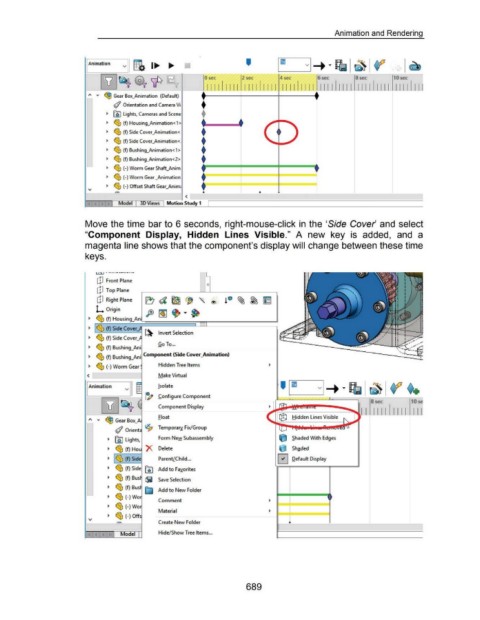
Move the time bar to 6 seconds, right-mouse-click in the 'Side Cover and select
"Component Display, Hidden Lines Visible." A new key is added, and a
magenta line shows that the component's display will change between these time
keys.
l l""i. J ••····--..-.... - • • -
dJ Front Plane
c
dJ Top Plane
dJ Right Plane
L Origin
~ ~ (f) Housing_An
~ ~ (f) Side Cover_
~------1 ~ Invert Selection
~ ~ (f) Side Cover_
~ ~ (f) Bushing_Ani Go To ...
~ ~ (f) Bushing_Ani Component (Side Cover_Animation)
~ ~ (-)Worm Gear Hidden Tree Items
< Make Virtual
I Animation !sol ate
v
~ Configure Component
8 sec 10 s
Component Display
II 111 11 11 1 1 Il l
Float Hidden Lines Visible
~ GearBox_A
(/ Orient <2p Temporal)! Fix/Group
~ @J Lights, Form New Subassembly Shaded With Edges
~ ~ (f)Hou X Delete Shaded
~ ~ (f) Side ParentLChild ... 0 Default Display
~ ~ (f) Side 00 Add to Favorites
~ ~ (f) Bus ~ Save Selection
~ ~ (f) Bus E;j Add to New Folder
~ ~ (-) Wo
Comment
~ ~ (-) Wo
Material
~ ~ (-) Off
Create New Folder •·~·--------- ------------'---------------'-------.
Model Hide/Show Tree Items ...
689

