Page 676 - 02. Subyek Computer Aided Design - Beginner’s Guide to SOLIDWORKS 2019- Level 1 by Alejandro Reyes
P. 676
Animation and Rendering


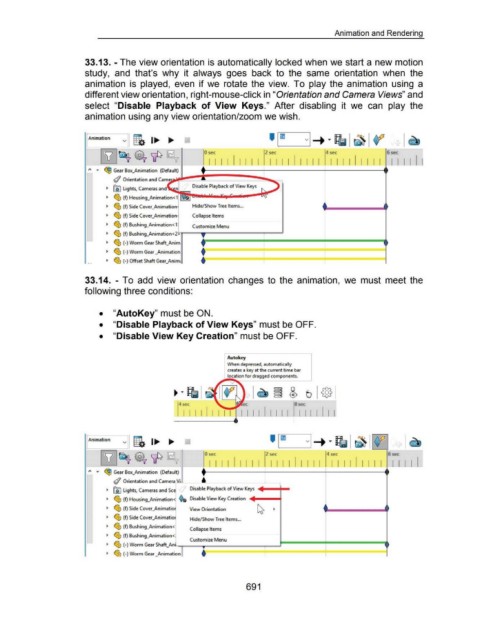
                                                      33.13. - The view orientation is automatically locked when we start a new motion


                                                      study,  and  that's  why  it  always  goes  back  to  the  same  orientation  when  the


                                                      animation  is  played,  even  if we  rotate  the  view.  To  play the  animation  using  a


                                                      different view orientation, right-mouse-click in "Orientation and Camera Views" and


                                                      select  "Disable  Playback  of View  Keys."  After  disabling  it  we  can  play  the


                                                      animation using any view orientation/zoom we wish.


                                                       ~mation                v  g.  1 ....                                                                                                                                     ••  •
                                                                                                                                                                                                                              ~


                                                                ~~ ~ 'IP                                                         0 sec                                 2 sec                                 4 sec         I I I  I I  I  I I I I
                                                                                                                                                                                                                                                   6sec

                                                                                                                                   I I  I  I I I I  I I  I I I  I  I  I  I  I I  I  I  I


                                                        "  ...  ~ Gear Box_Animation  (Default)


                                                                        (/ Orientation and Came  ~~~ ~------~ ....... .:::--=
                                                                   ~  [ID  Lights, Cameras and                           Disable Playback of View Keys


                                                                   ~  ~ (f) Housing_Animation<1  ~


                                                                   ~  ~ (f) Side Cover_Animation                         Hide/Show Tree Items ...


                                                                   ~  ~ (f) Side Cover_Animation                         Collapse Items

                                                                   ~  ~ (f) Bushing_Animation<1                          Customize Menu


                                                                   ~  ~ (f) Bushing_Animation<2                                •
                                                                   ~  ~ ~)WormG~rSha~nim                                         ~~~~~~~~~~~~~~~~~~~~~


                                                                   ~  ~ (-) Worm Gear _Animation                               + ----------,------------.-------
                                                                   ~  ~ ~) Ofu~ShaftG~~nim;                                    .~~~~~~~~~~~~~~~~~~~~~


                                                      33.14.  - To  add  view  orientation  changes  to  the  animation,  we  must  meet the


                                                      following three conditions:


                                                               •  "Auto Key" must be ON.


                                                               •  "Disable Playback of View Keys" must be OFF.


                                                               •  "Disable View Key Creation" must be OFF.


                                                                                                                                               Auto key

                                                                                                                                               When depressed, automatically
                                                                                                                                               creates a key at the current time bar
                                                                                                                                               location for dragged components.


                                                                                                                                                         ec                              8sec

                                                                                                                   I I I I                              I I I I I I I I I  I I I I I I I


                                                       ~mation  j  g.  1....  ....


                                                                ~~ ~ 'IP                                                         0 sec                                 2 sec                                 4 sec                                  6sec


                                                                                                                                                                                                                                                      I I I I
                                                                                                                                    I  I  I  I I I  I  I  I I I  I I  I I I  I  I  I I I I  I

                                                        "  ...  ~ Gear Box_Animation  (Default)                                              _.__                                         _.__


                                                                        (;j Orientation and Camera,..._u· ... _           _, '----------L----.

                                                                   ~  [ID Lights, Cameras and Sc                        Disable Playback of View Keys

                                                                   ~  ~ (f) Housing_Animation<  ~$ Disable View Key Creation


                                                                   ~  ~ (f) Side Cover_Animatio)                       View Orientation


                                                                   ~  ~ (f) Side Cover_Animatio)                        Hide/Show Tree Items ...

                                                                   ~  trtl..  (f) Bushing_Animation<
                                                                        "lJ                                             Collapse Items

                                                                   ~  ~ (f) Bushing_Animation<                                     .
                                                                                                                        Custom1ze Menu
                                                                   ~  ~ (-) Worm Gear Shaft_An - ·
                                                                   ~  ~ (-)WormG~r~nim~ion~ .~~~~~~~~~~~~~~~~~~~~


                                                                                                                                                           691
   671   672   673   674   675   676   677   678   679   680   681