


Page 681 - 02. Subyek Computer Aided Design - Beginner’s Guide to SOLIDWORKS 2019- Level 1 by Alejandro Reyes
P. 681
Beginner's Guide to SOLIDWORKS 2019- Level I


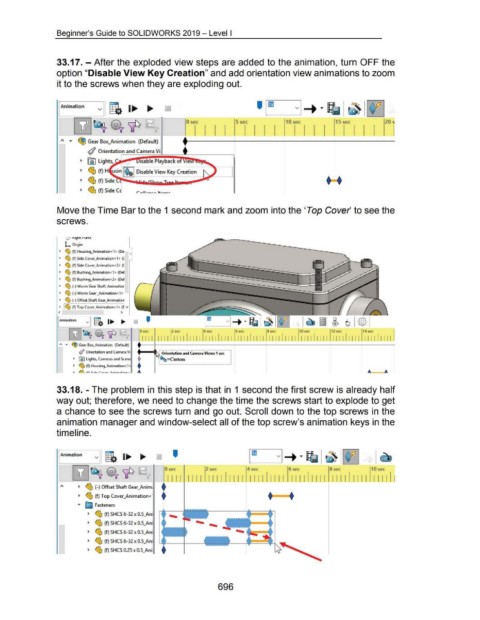
                                    33.17.- After the exploded view steps are added to the animation, turn OFF the


                                    option "Disable View Key Creation" and add orientation view animations to zoom


                                    it to the screws when they are exploding out.


                                      ~mation  -              v  g.  1....  ....


                                               BB~~ 'lP                                                              0 sec                          5 sec                           10 sec                         15 sec


                                       ~  •  ~GearB~nim~ion ~~aul~                                                 +~~~~~~~~~~~~~~~~~~~~~~


                                                        ~ Orientation and Camera Vi                                t


                                                   ._  jiD Lights,                      1sable Playback of  1e  ~il......


                                                   ._  ~ (f) H  usi  ~~$~  Disable View Key Creation


                                                   ._  ~ (f) Side                        ·                             ..                                                                                    t  t


                                                   ._   PLl.  (f) Side C
                                                        "'-1:)                        r-••~--r- ... _ .._r


                                    Move the Time Bar to the 1 second mark and zoom into the 'Top Cover' to see the


                                    screws.


                                          L;J  ~1 gnt I' lane

                                         L  Origin

                                      •  ~ (f) Housing_Animation<l> (De-
                                                                                  0
                                      •  ~ (f) Side Cover_Animation<1> ([

                                      •  ~ (f) Side Cover_Animation<2> ([

                                      •  ~ (f) Bushing_Animation<1>  (Def
                                      •  ~ (f) Bushing_Animation<2>  (Def

                                      •  ~ (-)Worm Gear Shaft_Animatior

                                      •  ~ (-)Worm Gear _Animation<1>

                                      •  ~ (-)Offset Shaft Gear_Animation

                                      •  ~~ (f) Top Cover_Animation<l> ([ v
                                     <                                      >

                                     [Animation  vI g.  1..- ..


                                            [YJ~~'lP                                    0 sec


                                                                                                    I Orientation and Camera Views 1 sec J
                                      "  ...  ~ Gear Box_Animation  (Default)

                                                  ~ Orientation and Camera Vi

                                               • liD lights, Cameras and Scene                       ~=Custom
                                               •  ~ (f) Housing_Animation<l>                                                    '


                                    33.18. - The problem in this step is that in  1 second the first screw is already half


                                    way out; therefore, we need to change the time the screws start to explode to get


                                    a chance to see the screws turn and go out. Scroll down to the top screws in the


                                    animation manager and window-select all of the top screw's animation keys in the


                                    timeline.


                                     r:ation                v  g.  1...  ....                                '


                                              [Y]~~'IP                                                  0 sec                     2 sec                    4 sec                     6 sec                     8 sec                     10 sec


                                                                                                          I I I  I I I I  I I  I  I I I I  I I I  I I I I I  I I I I  I I I I  I I I  I  I I I  I I I I  J
                                       ~~<        ._  ~ (-) Offset Shaft Gear_Anim;                   +


                                                  ._  ~ (f) Top Cover_Animation<·                     +                                                                  +~

                                                                                                       I
                                                 •  ~ Fasteners

                                                        ._  ~ (f) SHCS 6-32 x O.S_Ani


                                                        ._  ~ (f) SHCS 6-32 x O.S_Ani

                                                        ._  ~ (f) SHCS 6-32 x O.S_Ani


                                                        ._  ~ (f) SHCS 6-32x0.5_Ani

                                                        ._  ~ (f) SHCS 0.25 x O.S_Ani


                                                                                                                                         696

