Page 686 - 02. Subyek Computer Aided Design - Beginner’s Guide to SOLIDWORKS 2019- Level 1 by Alejandro Reyes
P. 686
Animation and Rendering


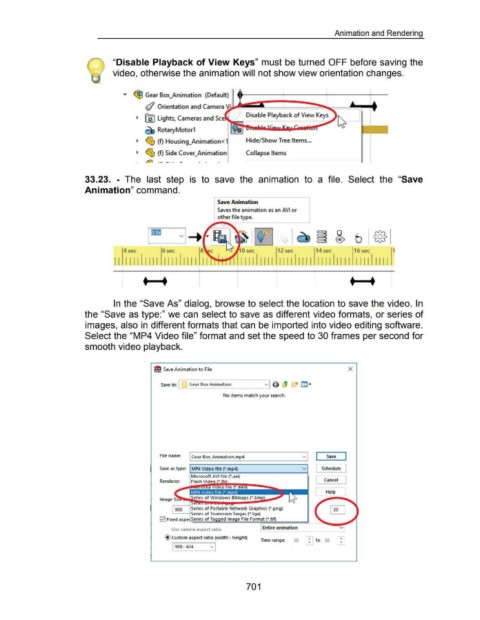
                                                                       "Disable Playback of View Keys" must be turned OFF before saving the


                                                                       video, otherwise the animation will not show view orientation changes .


                                                                              ..,.  ~ Gear Box_Animation  (Default)


                                                                                            #  Orientation and Camera


                                                                                      ~  @J  Lights, Cameras and S


                                                                                            ~ RotaryMotor1


                                                                                      ~  ~ (f)  Housing_Animation< 1                                       Hide/Show Tree Items ...


                                                                                      ~  ~ (f) Side Cover_Animation                                        Collapse Items


                                                                                            .M  ·- - ·  .        -


                                                      33.23.  - The  last  step  is  to  save  the  animation  to  a  file.  Select  the  "Save


                                                      Animation" command.


                                                                                                                                         Save Animation

                                                                                                                                         Saves the animation as an AVI or

                                                                                                                                         other file type.


                                                                                              j&D                VI-+ .                               ·.  ~                                ~ ~                      0                     @


                                                                                              I                                                                                                                    (i)         tJ
                                                                              4 sec                   6 sec                                                                    12 sec                 14 sec                  16 sec                   1


                                                                        I I  I I I I  I I I I  I I I I  I I I I  I I                               I  I I I I  I II I  II I I  I I I I  I I I I  I I I I  I I I I  II I I

                                                                             I                       I                       I                       I                        I                                              I                        I
                                                                                                                                                                                                                             I
                                                                                           t          ~t                                                                                                                    t  t


                                                                        In the "Save As" dialog,  browse to select the location to save the video.  In


                                                      the "Save as type:" we can select to  save as different video formats, or series of


                                                      images, also in different formats that can be imported into video editing software.


                                                      Select the "MP4 Video file" format and set the speed to 30 frames per second for


                                                      smooth video playback.


                                                                                                 I! Save Animation to File                                                                                                 X


                                                                                                      Save  in: I      Gear Box Animation                                                    r.":":l..,
                                                                                                                                                                                             l.!.!.J


                                                                                                                                             No items match your search.


                                                                                                                                                                                              vi
                                                                                                     File name:  I Gear Box_Animation.mp4                                                                    Save
                                                                                                                                                                                              v

                                                                                                     Save as type:  MP4 Video file (*.mp4)                                                                Schedule

                                                                                                                        Microsoft AVI file (*.avi)
                                                                                                     Renderer:          Flash Vide                                                                     l    Cancel

                                                                                                                                                                                                      L      Help


                                                                                                                                                                                                                ~


                                                                                                                                                                     Entire animation                                v
                                                                                                            Use  camera aspect ratio

                                                                                                        @Custom aspect ratio (width : height)                                                                         ...
                                                                                                                                                                    Time range:          30       ...  to  30         ...
                                                                                                                                                                                                  ...
                                                                                                            1908= 424               v  1


                                                                                                                                                           701
   681   682   683   684   685   686   687   688   689   690   691