Page 687 - 02. Subyek Computer Aided Design - Beginner’s Guide to SOLIDWORKS 2019- Level 1 by Alejandro Reyes
P. 687
Beginner's Guide to SOLIDWORKS 2019- Level  I


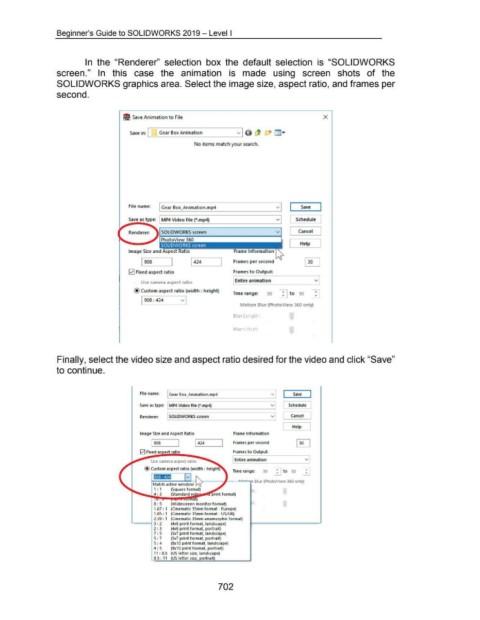
                                                      In  the  "Renderer"  selection  box  the  default  selection  is  "SOLIDWORKS


                                    screen."  In  this  case  the  animation  is  made  using  screen  shots  of  the


                                    SOLIDWORKS graphics area. Select the image size, aspect ratio,  and frames per


                                    second.


                                                                              fjl Save Animation to File                                                                                                   X


                                                                                  Save  in: I._ __ G_e_ar_B_o_x_A_n_im_a_t_io_n ______ v_JI


                                                                                                                          No items match your search.


                                                                                 File name'  I Gear Box_Animation.mp4                                                         vi             Save        I


                                                                                                                                                                              v
                                                                                 Save as type:  MP4 Video file r.mp4)                                                                     Schedule

                                                                                                                                                                              v
                                                                                 Renderer:            SOLIDWORKS screen                                                               l     Cancel      J

                                                                                                      PhotoView  3-60
                                                                                                                                                                                      r      Help      J


                                                                                 Image Size and Aspect Ratio

                                                                                         1908                                                      Frames per second


                                                                                 0  Fixed aspect ratio                                             Frames to Output


                                                                                         Use camera aspect ratio                                    Entire animation                                  v

                                                                                     @ Custom aspect ratio (width : height)
                                                                                                                                                   Time range:          30       ;    to  30
                                                                                         1908:424                 v  1
                                                                                                                                                       Motion Blur (PhotoView 360 only)


                                                                                                                                                   Blur Length:


                                                                                                                                                   Blur Offset:


                                     Finally, select the video size and aspect ratio desired for the video and click "Save"


                                    to continue.


                                                                                        File name:       I Gear Box_Animation.mp4                                         vi            Save

                                                                                                                                                                          v
                                                                                        Save  as type:  MP4 Video f ile (*.mp4)                                                       Schedule
                                                                                                                                                                          v
                                                                                        Renderer.          SOLIDWORKS screen                                                           cancel     J

                                                                                                                                                                                  L     Help


                                                                                        Image Size and Aspect Ratio                                Frame Information

                                                                                               1908                                                Frames per second


                                                                                        12] Fixed as  ect rat io                                   Frames to Output


                                                                                               Use camera aspect ratio                              Entire animation                            v

                                                                                           @ Custom aspect ratio (Width : height)                                                               ...
                                                                                                                                                  Time range:        30       :   to  30        ...


                                                                                                Match  active window
                                                                                                 1 : 1      (Square f ormat)
                                                                                                                                                              th:
                                                                                                 4 : 3      (Standard vJ.Iji  ~-rj:
                                                                                                                          a )
                                                                                                 8 : 5      (Widescreen monit or format)                       t:
                                                                                                 1.'67 : 1  (Cinematic 35mm format - Europe)
                                                                                                 1.85 : 1  (Cinematic 35mm format - US/ UK)
                                                                                                 2.39 : 1  (Cinematic 35mm anamorphic format)
                                                                                   L-----1 3 : 2            (4x6 print format, landscape)
                                                                                                 2 : 3      (4x6 print format, portrait)
                                                                                                 7 : 5      (5x7 print format, landscape)
                                                                                                 5 : 7      (5x7 print format, portrait)
                                                                                                 5 : 4      (8x10 print f ormat, landscape)
                                                                                                 4 : 5      (8x10 print format, portrait)
                                                                                                 11 : 8.5  (US letter size, landscape)
                                                                                                 8.5 : 11  US letter size  ortrait


                                                                                                                                         702
   682   683   684   685   686   687   688   689   690   691   692