


Page 683 - 02. Subyek Computer Aided Design - Beginner’s Guide to SOLIDWORKS 2019- Level 1 by Alejandro Reyes
P. 683
Beginner's Guide to SOLIDWORKS 2019- Level I


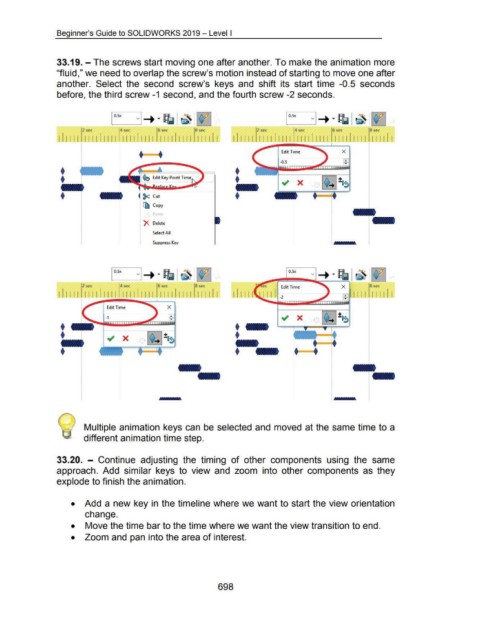
                                    33.19.- The screws start moving one after another. To make the animation more


                                    "fluid," we need to overlap the screw's motion instead of starting to move one after


                                    another.  Select  the  second  screw's  keys  and  shift  its  start  time  -0.5  seconds


                                    before, the third screw -1  second, and the fourth screw -2 seconds.


                                                    2~                      4 RC                    6RC                    8~                                                            4 RC                    6 sec                  8 sec

                                     !IIIII  II II IIIII  II II  II IJ  111111111  111111                                                          111111                                                         111111111  111111


                                                                                        +====::                                                                                  Edit Time                             X


                                                                                                                                                                                -0.5


                                                                                          ~ Cut


                                                                                          [ll  Copy


                                                                                           X  Delete


                                                                                                Select All


                                                                                                Suppress Kev


                                                                            4 Rc                      sec                  8sec                                                                                        X                8sec

                                                                                                     111111111  111111                             1111 II                                                              ~ 1111  111111

                                                                                                                                                                                                     ~~~

                                                                    Edit Time


                                                                   -1


                                                                                                                                                                                         •  •


                                                     Multiple animation keys can  be selected and  moved at the same time to a


                                                     different animation time step.


                                    33.20.  - Continue  adjusting  the  timing  of  other  components  using  the  same


                                    approach.  Add  similar  keys  to  view  and  zoom  into  other  components  as  they


                                    explode to finish the animation.


                                             •  Add a new key in  the timeline where we want to start the view orientation


                                                      change.


                                             •  Move the time bar to the time where we want the view transition to end.


                                             •  Zoom and pan into the area of interest.


                                                                                                                                         698

