


Page 678 - 02. Subyek Computer Aided Design - Beginner’s Guide to SOLIDWORKS 2019- Level 1 by Alejandro Reyes
P. 678
Animation and Rendering


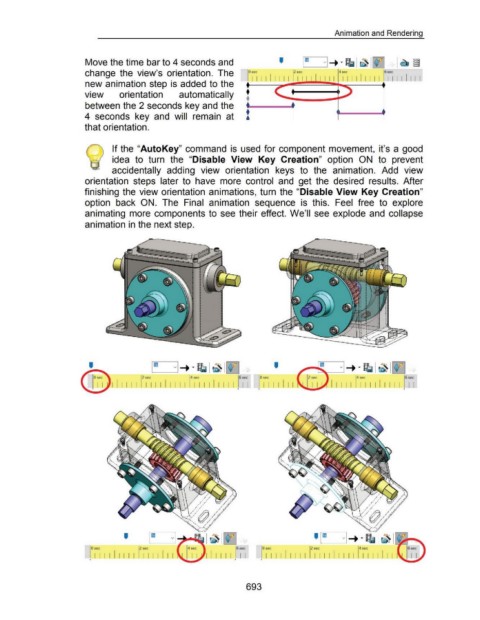
                                                      Move the time bar to 4 seconds and


                                                      change  the  view's  orientation.  The


                                                      new animation step is added to the


                                                                                                                                                           •
                                                      view                 orientation                           automatically                             •
                                                                                                                                                           •
                                                      between the 2 seconds key and the
                                                      4  seconds  key  and  will  remain  at  •                                                                                        •

                                                                                                                                                           •


                                                      that orientation.


                                                                       If the "AutoKey" command  is  used for component movement,  it's a  good
                                                                 1

                                                                       idea  to  turn  the  "Disable  View  Key  Creation"  option  ON  to  prevent


                                                                       accidentally  adding  view  orientation  keys  to  the  animation.  Add  view


                                                      orientation  steps  later  to  have  more  control  and  get the  desired  results.  After


                                                      finishing  the view orientation  animations, turn  the "Disable View Key Creation"


                                                      option  back  ON.  The  Final  animation  sequence  is  this.  Feel  free  to  explore


                                                      animating  more  components to  see their effect. We'll  see explode and  collapse


                                                      animation in the next step.


                                                                                                                                                                            '


                                                                                          2 sec                         4 sec                                       0 sec

                                                                       I I I I I  I            I  I I.LUJ.  I  I  I                                                   I I
                                                                                                                       '


                                                                              '


                                                          0 sec                         2 sec                                                                        o~                            2s~                            4~
                                                            I I  I I I I I I  I  I I I  I I II                                                                         I I I I I I I I I  I I I  I I II II  I  I I  I I I  I I

                                                                                                                                                                                                   '                             '                          ~.,


                                                                                                                                                           693

