


Page 677 - 02. Subyek Computer Aided Design - Beginner’s Guide to SOLIDWORKS 2019- Level 1 by Alejandro Reyes
P. 677
Beginner's Guide to SOLIDWORKS 2019- Level I


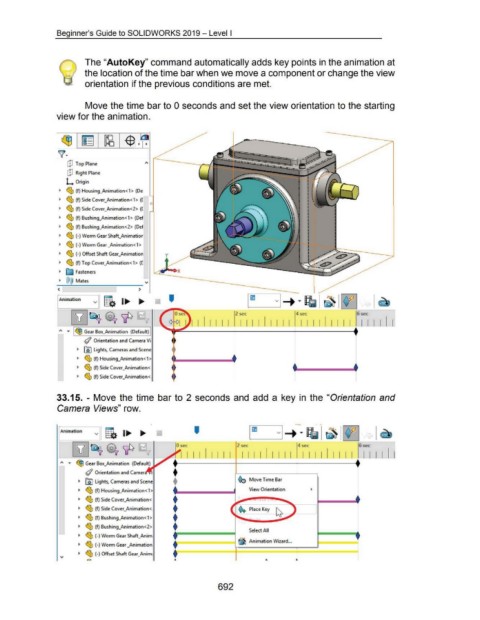
                                                      The "AutoKey" command automatically adds key points in the animation at


                                                      the location of the time bar when we move a component or change the view


                                                      orientation if the previous conditions are met.


                                                      Move the time bar to 0 seconds and set the view orientation to the starting


                                    view for the animation.


                                           cP  Top Plane


                                           dJ  Right Plane

                                          L  Origin


                                      ~  ~ (f) Housing_Animation<1> (De

                                      ~  ~ (f) Side Cover_Animation<1>  ([


                                      ~  ~ (f) Side Cover_Animation<2>  ([

                                      ~  ~ (f) Bushing_Animation<1> (Def


                                      ~  ~ (f) Bushing_Animation<2> (Def

                                      ~  ~ (-)Worm Gear Shaft_Animatior


                                      ~  ~ (-)Worm Gear _Animation<1 >

                                      ~  ~ (-) Offset Shaft Gear_Animation


                                      ~  ~ (f) Top Cover_Animation<1>  ([


                                      ~  ~ Fasteners

                                      ~  @@  Mates                                          -.;
                                    --~----------~-----
                                     <                                                 >

                                     ~mation               v  g.  I...  ....                               '


                                             lli]~ ~'1P                                                                                             2 sec                                 4 sec                                 6 sec


                                      ;.,  ..,..  l ~ Gear Box_Animation  (Default) I                                    I I I I I I I  I I I I I I I I I  I I I I I I I I I  I I I I


                                                     ~ Orientation and Camera Vi


                                                 ~  rru Lights, Cameras and Scene

                                                 ~  ~ (f) Housing_Animation<1>


                                                 ~  ~ (f) Side Cover_Animation<

                                                 ~  ~ (f) Side Cover_Animation<.


                                    33.15. - Move the  time  bar to 2 seconds and  add  a  key in  the "Orientation and


                                     Camera Views" row.


                                                                                                                                                                                         -            . ,
                                                            v  g.
                                                                                                                                                                                                                        ~
                                     I Animation                              I ...  ....                                 '                                  I [I             VI-+ .....  ~                    ··~
                                                                                                                                                                                                             ~

                                                                                                                                                             I
                                              ~~ ~'1P                                                          0 sec                                 2 sec                                 4 sec


                                      ;.,  .....                                                                  I I I I I I I                         I I I I  I I  I  I  I  I  I I I I  I I  I  I I I I
                                                 ~ Gear Box_Animation  (Default)

                                                      ~ Orientation and Camer


                                                  ~   rru  Lights, Cameras and Scene                                                                  ¢G  Move Time Bar

                                                  ~   ~ (f) Housing_Animation < 1 >                                                                          View Orientation
                                                                                                             +
                                                  ~
                                                      ~ (f) Side Cover_Animation<
                                                                                                             +                                                                ~
                                                  ~
                                                      ~ (f) Side Cover_Animation<,

                                                  ~   ~ (f) Bushing_Animation<1>                             +                                                  .....

                                                  ~   ~ (f) Bushing_Animation<2>                             +                                               Select All


                                                  ~   ~ (-)Worm Gear Shaft_Anim

                                                  ~   ~ (-) Worm Gear _Animation                             t                                        ~ Animation Wizard ...


                                                  ~   ~ (-)Offset Shaft Gear_Anim;                           t
                                     - \I              ,:>,                                                   ..                                                       ..                 ..


                                                                                                                                         692

