Page 673 - 02. Subyek Computer Aided Design - Beginner’s Guide to SOLIDWORKS 2019- Level 1 by Alejandro Reyes
P. 673
Beginner's Guide to SOLIDWORKS 2019- Level I


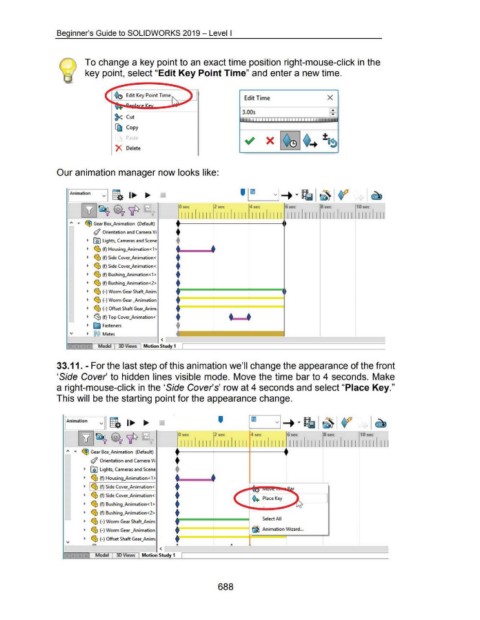
                                                      To change a key point to an exact time position right-mouse-click in the


                                                      key point, select "Edit Key Point Time" and enter a new time.


                                                                                                                        []                                Edit Time                                           X


                                                                                                                                                         3.00s
                                                                         ~ Cut


                                                                         [{l  Copy


                                                                                                                                                                        X


                                                                         X  Delete


                                    Our animation manager now looks like:


                                            E    mation  _j g.  1...  ...                                                                              ' 1m
                                                                                                                                               --           '                                                                                   -
                                                    ~~ 0?'1P                                            -        0 sec                 2 sec                 4 sec                 6 sec                  8 sec                 1 0 sec


                                                                                                                 _111111111 _I  II  II Ill __ II II II  I I  I I I I II I I L_l I I I II I I I_ :-I I I I II I I


                                            "  ...  ~ Gear Box_Animation  (Default)                                                                                                •
                                                                                                               •
                                                           </ Orientation and Camera Vi

                                                       ~  IAJ  Lights, Cameras and Scene                       +
                                                                                                               •  •

                                                       ~  ~ (f) Housing_Animation<1>

                                                       ~  ~ (f) Side Cover_Animation<                          •

                                                       ~  ~ (f) Side Cover_Animation<.                         •


                                                       ~  ~ (f) Bushing_Animation<1 >                          •

                                                       ~  ~ (f) Bushing_Animation<2>                           •

                                                       ~  ~ (-) Worm Gear Shaft_Anim                           •======~====~====~, .
                                                                                                               •

                                                       ~  ~ (-) Worm Gear _Animation                           f                                            L

                                                       ~  ~ (-) Offset Shaft Gear_Anim;                                                                       -------.
                                                                                                               •                                • •
                                                       ~  ~ (f) Top Cover_Animation<·


                                                       ~  ~ Fasteners                                          •

                                                       ~  @@  Mates
                                                                                                     <
                                                              Model  I  3D Views  1 Motion Study 1  I


                                    33.11. - For the last step of this animation we'll change the appearance of the front


                                    'Side Cover' to hidden lines visible mode. Move the time bar to 4 seconds.  Make


                                    a right-mouse-click in the 'Side Cover's' row at 4 seconds and select "Place Key."


                                    This will be the starting point for the appearance change.


                                         E     mation  l  g.  1...  ...                                                                  '

                                                  ~~ ~ 'IP                                                      0 sec                  2 sec                  4 sec                  6 sec                 8 sec                  10 sec


                                                                                                                  111111111  111111111  111111111  111111111  111111111  1111111


                                                    ~ Gear Box_Animation  (Default)
                                                                                                              •

                                                         </ Orientation and Camera Vi

                                                     ~  00 Lights, Cameras and Scene                          +
                                                                                                              •  •
                                                     ~  ~ (f) Housing_Animation<1 >


                                                     ~  ~~ (f) Side Cover_Animation<                          •

                                                     ~  ~ (f) Side Cover_Animation<.                          +                                                ~+ PlaceKey
                                                                                                              •
                                                     ~  ~ (f) Bushing_Animation< 1 >


                                                     ~  ~ (f) Bushing_Animation<2>                            •

                                                     ~  ~ (-) Worm Gear Shaft_Anim                               ~============~                                      Select All
                                                                                                              •

                                                     ~  ~ (-) Worm Gear _Animation                                                                             fjj Animation Wizard ...

                                                     ~  ~ (-) Offset Shaft Gear_Anim;                          .~--'------

                                                                                                               ·--------~-- ·~~··--------~------~------~----~
                                                                                                     <
                                                             Model        3D Views        Motion Study 1


                                                                                                                                         688
   668   669   670   671   672   673   674   675   676   677   678