


Page 670 - 02. Subyek Computer Aided Design - Beginner’s Guide to SOLIDWORKS 2019- Level 1 by Alejandro Reyes
P. 670
Animation and Rendering
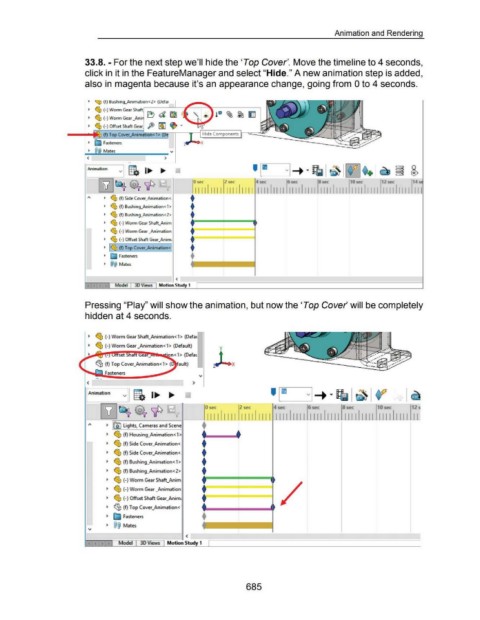
33.8. -For the next step we'll hide the 'Top Cover'. Move the timeline to 4 seconds,
click in it in the FeatureManager and select "Hide." A new animation step is added,
also in magenta because it's an appearance change, going from 0 to 4 seconds.
~ ~ (t) Hushmg_AmmatJOn<Z> (Ueta1
~ ~ (-)Worm Gear
~ ~ (-)Worm Gear _An· ~ d ~
~ (-)Offset Shaft Gear ft ~ ~ ~
(f) Top Cover_An
~ E:::;a Fasteners
~~~~M-a-t5------~----- v
< >
!"Animation v g. I... ... • ' ~1.~~ ~vi -+ • ~ ~ ~ ~
2
~ ~ ~ ~ -----,...-~ s-~e~-~ -1-ll...,..-1-sle~-~~-~~-~~ ~s~e~ 11 111 1 ~7~ 111111 lsle~ 111111 1°1 ~~ IIIII 1 17~ 11111 Ill
1 5
1 2
8
~ ~ (f) Side Cover_Animation<, •
~ ~ (f) Bushing_Animation<1 > •
~ ~ (f) Bushing_Animation<2> •
~ ~ (-)Worm Gear Shaft_Anim i====*===
~ ~ (-)Worm Gear _Animation •===~===
•===::::::====
~ ~ (-) Offset Shaft Gear_Anim;
~ ~~ (f) Top Cover_Animation<· •
~ E::::;a Fasteners
~ @@ Mat5
<
Model 30 Views Motion Study 1
Pressing "Play" will show the animation, but now the 'Top Cover' will be completely
hidden at 4 seconds.
~ ~ (-)Worm Gear Shaft_Animation<1> (Defat
~ ~ (-)Worm Gear _Animation<1> (Default)
ault)
,...,_
< >
Animation
v
0 sec 2 sec 4 sec 6 sec 8 sec 10 sec 12
~ I@) lights, Cameras and Scene - +
111111111 111111111 1111 1111111111111 11111111 1111 1111 II
~ ~ (f) Housing_Animation<1> + +
~ ~ (f) Side Cover_Animation< +
~ ~ (f) Side Cover_Animation<. +
~ ~ (f) Bushing_Animation<1> +
~ ~ (f) Bushing_Animation<2> +
~ ~ (-) Worm Gear Shaft_Anim
~ ~ (·)Worm Gear _Animation
~ ~ (-)Offset Shaft Gear_Anim;
~ ~(f) Top Cover_Animation<'
~ ~ Fasteners
~ @@ Mates
<
Model Motion Study 1
685

