Page 671 - 02. Subyek Computer Aided Design - Beginner’s Guide to SOLIDWORKS 2019- Level 1 by Alejandro Reyes
P. 671
Beginner's Guide to SOLIDWORKS 2019- Level I


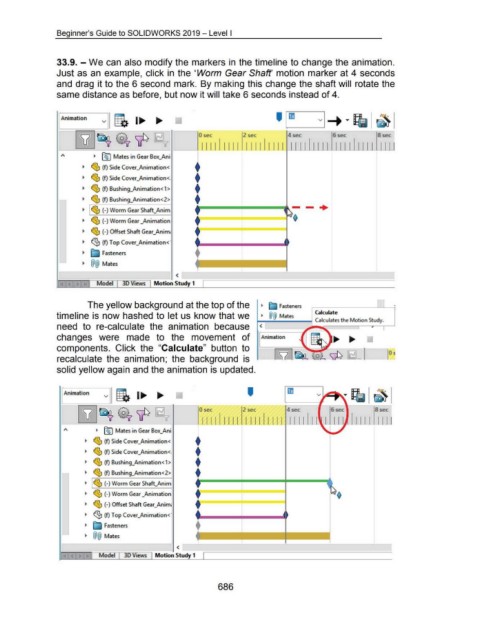
                                    33.9. -We can also modify the markers in the timeline to change the animation.


                                    Just as an example, click in  the 'Worm  Gear Shaft' motion marker at 4 seconds


                                    and drag it to the 6 second  mark.  By making this change the shaft will  rotate the


                                    same distance as before, but now it will take 6 seconds instead of 4.


                                      fAnimation


                                                                                                                                                                     --
                                                                                                                             0 sec                       2 sec                       4sec                        6sec                        8sec


                                                                                                                               1111          1111          1111          1111  1 1 11                11 11         11 11         11 1 1  I ll

                                                           ~  ~ Mates in Gear Box_Ani

                                                                                                                           t
                                                    ~  ~ (f) Side Cover_Animation<


                                                    ~  ~ (f) Side Cover_Animation<.                                        t

                                                                                                                           t
                                                    ~  ~ (f) Bushing_Animation < 1 >

                                                                                                                           t
                                                    ~  ~ (f) Bushing_Animation < 2>


                                                    ~  ~ ~ (-) Worm Gear Shaft_Anim                                           F=======~======4                                                  -·


                                                                                                                           f
                                                    ~  ~ (-) Worm Gear _Animation
                                                                                                                           +------'---------

                                                    ~  ~ (-) Offset Shaft Gear_Anim;


                                                    ~  <g,  (f) Top Cover_Animation<·


                                                    ~  ~ Fasteners                                                         +


                                                    ~  @@  Mates


                                                                                                               <

                                                             Model            30 Views           Motion Study 1


                                                                                                                                                                            -
                                                        The yellow background at the top of the                                                                     ~  ~ Fasteners                                                           01


                                    timeline is now hashed to let us know that we                                                                                   ~  @@  Mates                      Calculate
                                                                                                                                                                  ....,._........, __ ~~ Calculates the Motion Study.
                                    need  to  re-calculate  the  animation  because                                                                                <


                                    changes  were  made  to  the  movement  of                                                                                     rAnimation


                                    components.  Click  the  "Calculate"  button  to


                                    recalculate  the  animation;  the  background  is


                                    solid yellow again and the animation is updated.


                                                                                                                                                            '


                                                                                                                             Osee                        2sec                       4sec                        6 sec                       8 sec


                                                                                                                               llllillll  ll!lll!ll  1111                                           II                          Ill  I  I  I  I


                                                             ~  ~ Mates in Gear Box_Ani
                                                                                                                           t
                                                      ~  ~ (f) Side Cover_Animation<
                                                                                                                           t
                                                      ~  ~ (f) Side Cover_Animation<.
                                                                                                                           t
                                                      ~  ~ (f) Bushing_Animation<1>
                                                                                                                           t
                                                      ~  ~ (f) Bushing_Animation<2>


                                                      ~  I ~ (-)Worm Gear Shaft_Anim                                        F=====*====l====:::;"


                                                      ~  ~ (-) Worm Gear _Animation                                        f:========::::==========


                                                      ~  ~ (-) OffsetShaftGear_Anim;                                       f


                                                      ~  ~ (f) Top Cover_Animation<·

                                                                                                                           t
                                                      ~  ~ Fasteners

                                                      ~  @@  Mates                                                          1-------'------t------l


                                                                                                               <

                                                               Model           30 Views           Motion Study 1


                                                                                                                                         686
   666   667   668   669   670   671   672   673   674   675   676