


Page 667 - 02. Subyek Computer Aided Design - Beginner’s Guide to SOLIDWORKS 2019- Level 1 by Alejandro Reyes
P. 667
Beginner's Guide to SOLIDWORKS 2019- Level I


                                    33.5. -Once the end  of the first animation step is defined, SOLIDWORKS needs


                                    to calculate the motion of the components.


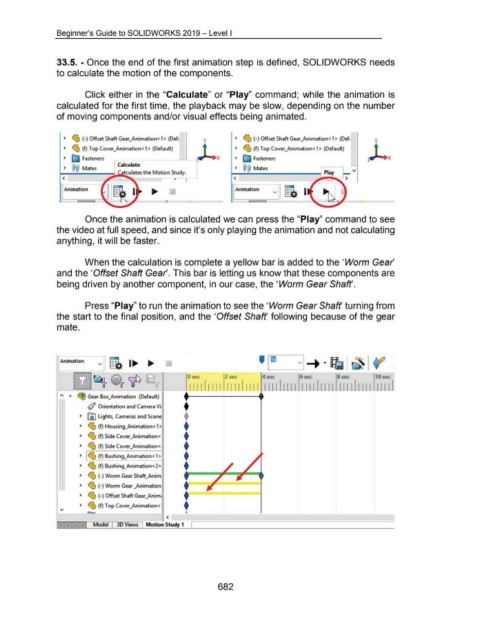
                                                      Click either in  the "Calculate"  or "Play"  command;  while the animation  is


                                    calculated for the first time, the playback may be slow, depending on the number


                                    of moving components and/or visual effects being animated.


                                                 -                                                                                                          -

                                         ~  <g;,  (-) Offset Shaft Gear_Animation<1> (Def;                                                          ~  <g;,  (-)Offset Shaft Gear_Animation<1>  (Def;


                                         ~  <g;,  (f) Top Cover_Animation<1> (Default)                                                              ~  <g;,  (f) Top Cover_Animation<1>  (Default)


                                         ~  E;j Fasteners                                                                                           ~  E;j Fasteners

                                         ~  @@  Mates                     Calculate                                                                 ~  @@  Mates
                                      1-<-----........, Calculates the Motion S~


                                                                                                                                                   <

                                      1 ~rAni~n~im3iati=on~=-~l  ~-~~= .... =-II~====                                                              fAnimation


                                                      Once the animation is calculated we can press the "Play" command to see


                                    the video at full speed, and since it's only playing the animation and not calculating


                                    anything, it will be faster.


                                                      When the calculation is complete a yellow bar is added to the 'Worm Gear'


                                    and the 'Offset Shaft Gear'. This bar is letting us know that these components are


                                    being driven by another component, in our case, the 'Worm Gear Shaft'.


                                                      Press "Play" to run the animation to see the 'Worm Gear Shaft' turning from


                                    the start to the final  position, and the 'Offset Shaft' following  because of the gear


                                    mate.


                                                                                                        •
                                      Animation
                                                              v
                                                                                                                                                   ---
                                                                                                                      0 sec                   2 sec                  4 sec                  6 sec                   8 sec                   10 sec


                                                                                                                        1111  1111  1111  1111  1111  1111  111111111  111111111  IIIII


                                      ~>o  •     ~ Gear Box_Animation  (Default)
                                                                                                                    f
                                                       (/ Orientation and Camera Vi
                                                                                                                    f
                                                   ~  ~ Lights, Cameras and Scene


                                                   ~  ~ (f) Housing_Animation<1>                                    f
                                                                                                                    f
                                                   ~  ~ (f) Side Cover_Animation<
                                                                                                                    f
                                                   ~  <!b  (f) Side Cover_Animation<


                                                   ~  ~ ~ (f) Bushing_Animation<1>                                  f
                                                                                                                    f
                                                   ~  ~ (f) Bushing_Animation<2>


                                                   ~  ~ (-)Worm Gear Shaft_Anim                                       l====i ===:::::::;::;  ==i


                                                   ~  ($ (-) Worm Gear _Animation                                   f


                                                   ~  <g;,  (-)Offset Shaft Gear....;Anim;                          t=========~=======
                                                                                                                    f
                                                   ~  ~ (f) Top Cover_Animation<·

                                                                                                               ~A~----~------~------~------~------~~
                                                                                                         <

                                                           Model          3D Views          Motion Study 1
                                                                                          ~----~~~---------------------------------------


                                                                                                                                         682

