


Page 664 - 02. Subyek Computer Aided Design - Beginner’s Guide to SOLIDWORKS 2019- Level 1 by Alejandro Reyes
P. 664
Animation and Rendering


                                                      33.1. -With the built-in tools in  SOLIDWORKS we can create an  animation of a


                                                      part or an  assembly;  in the  latter case,  the animation  can  show the  assembly in


                                                      motion,  how to  assemble the  components  (collapse),  how to  disassemble them


                                                      (explode), etc. using a simple interface.


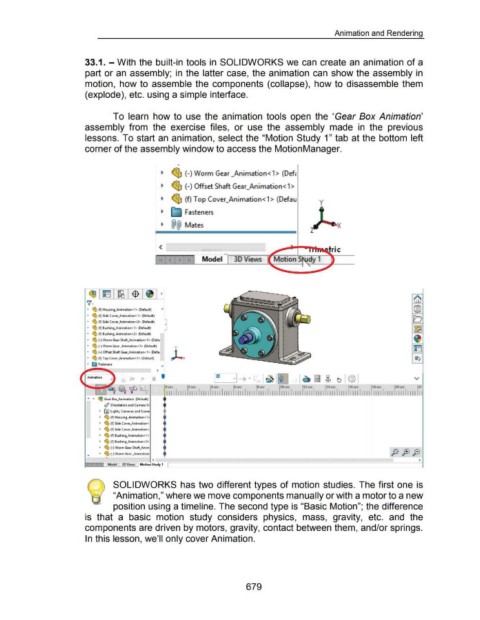
                                                                        To  learn  how to  use  the  animation  tools  open  the  'Gear Box Animation'


                                                      assembly  from  the  exercise  files,  or  use  the  assembly  made  in  the  previous


                                                      lessons. To start an animation, select the "Motion Study 1" tab at the bottom left


                                                      corner of the assembly window to access the Motion Manager.


                                                                                                                -


                                                                                                      ~  ~ (-)Worm Gear _Animation <1> (Defc


                                                                                                      ~  ~ (-)Offset Shaft Gear_Animation< 1 >


                                                                                                      ~  <i]:,  (f) Top Cover_Animation< 1 > (Defau                                                      y


                                                                                                                     Fasteners


                                                                                                      ~  @@  Mates                                                                                                  X


                                                                                                                               Model


                                                                                                     >


                                                       •  <g, (f) Housing_Animation<1> (D~fault)

                                                       •  <g, (f) Side Cover_Animation<1> (Default)
                                                       •  <g, (f) Side Cover_Animation<2> (Default)
                                                                                                        0
                                                       •  <g, (f) Bushing_Animation<1> (Default)
                                                       •  <g, (f) Bushing_Animation<2> (Default)
                                                       •  <g, (-)Worm Gear Shaft_Animation< 1> (Defat

                                                       •  <g, (-)Worm Gear _Animation< 1>  (Default)
                                                       •  <g, (-)Offset Shaft Gear_Animation<1> (Defat

                                                       •  <g, (f) Top Cover_Animation<1> (Default)
                                                       •  ~ Fasteners
                                                                                                   >


                                                       "'  •  ~ Gear Box_Animation  (Default)
                                                                  ~ Orientation and Camera Vi
                                                               • !AI Lights, Cameras and Scene

                                                               •  <g, (f) Housing_Animation<1>
                                                               •  <g, (f) Side Cover_Animation<
                                                               •  <g, (f) Side Cover_Animation<

                                                               •  <g, (f) Bushing_Animation<1>
                                                               •  <g, (f) Bushing_Animation<2>
                                                               •  <g, (-) Worm Gear Shaft_Anim
                                                       .,      •  <g, (-) Worm Gear _Animation
                                                                                                                                                                                              •
                                                                   ~
                                                                                                <                                                                                                                                                                      >
                                                                    Model    3D Views   Motion Study 1


                                                                        SOLIDWORKS has two different types of motion  studies. The first one is


                                                                        "Animation," where we move components manually or with a motor to a new


                                                                        position using a timeline. The second type is "Basic Motion"; the difference


                                                      is  that  a  basic  motion  study  considers  physics,  mass,  gravity,  etc.  and  the


                                                      components are driven by motors, gravity, contact between them, and/or springs.


                                                      In this lesson, we'll only cover Animation.


                                                                                                                                                           679

