


Page 685 - 02. Subyek Computer Aided Design - Beginner’s Guide to SOLIDWORKS 2019- Level 1 by Alejandro Reyes
P. 685
Beginner's Guide to SOLIDWORKS 2019- Level I
0, Mot or
-./ X
~~~Rotary Motor
... ~ .
..
ComponenVDirection A .,
.
lliJ I Face< 1 >@Worm Gear Shaft_ I 0 ' ' .
•
' ;
\
~ '
Face< 1 >@Worm Gear Shaft
~ 1~.....-1 __ ___..J
Distance v
/ 1800deg ~
'V
7.00s ~
'V
8.00s ~
'V
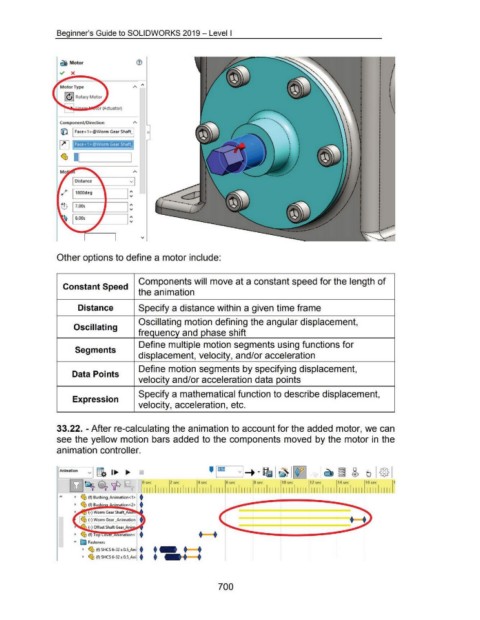
Other options to define a motor include:
Components will move at a constant speed for the length of
Constant Speed
the animation
Distance Specify a distance within a given time frame
Oscillating motion defining the angular displacement,
Oscillating
frequency and phase shift
Define multiple motion segments using functions for
Segments
displacement, velocity, and/or acceleration
Define motion segments by specifying displacement,
Data Points
velocity and/or acceleration data points
Specify a mathematical function to describe displacement,
Expression
velocity, acceleration, etc.
33.22. -After re-calculating the animation to account for the added motor, we can
see the yellow motion bars added to the components moved by the motor in the
animation controller.
' lCD
v g. 1..... .....
I Animation
'
[1J~ ~'IP
I I I I
Worm Gear .......... t
I • •
Offset Shaft
~ ~ (f) op • •
... E:a Fasteners
~ ~ (f) SHCS6-32x0. • • •
- · •
~ ~ (f) SHCS 6-32 x 0. •
700

