


Page 562 - Subyek Computer Aided Design - [David Planchard] Engineering Design with SOLIDWORKS
P. 562
Swept, Lofted and Additional Features Engineering Design with SOLIDWORKS® 2018
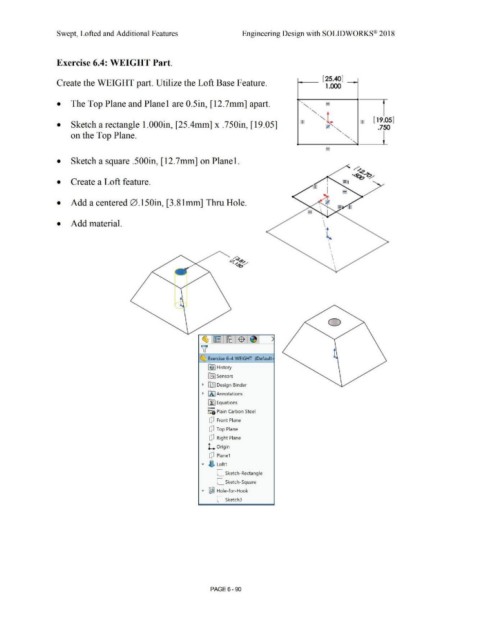
Exercise 6.4: WEIGHT Part.
Create the WEIGHT part. Utilize the Loft Base Feature. i------- [ 25.40] -----t
1.000
• The Top Plane and Planel are 0.5in, [12.7mm] apart.
• Sketch a rectangle 1.000in, [25.4mm] x .750in, [19.05]
on the Top Plane.
• Sketch a square .500in, [12.7mm] on Planel.
• Create a Loft feature.
• Add a centered 0.150in, [3.81mm] Thru Hole.
• Add material. \
'l
•
\
I
\
\
0
~ Exercise 6-4 WEIGHT (Default·
[€}] History
~ Sensors
• [DJ Design Binder
• IA] Annotations
[fJ Equations
0 -
:=1 Plain Carbon Steel
Q Front Plane
Q Top Plane
Q Right Plane
L Origin
Q Plane1
"' ~ Loft1
L Sketch-Rectangle
L. Sketch-Square
"' ~ Hole-for-Hook
C sketch3
PAGE6-90

