Page 560 - Subyek Computer Aided Design - [David Planchard] Engineering Design with SOLIDWORKS
P. 560
Swept, Lofted and Additional Features                                                                                                                      Engineering Design with SOLIDWORKS® 2018


                                                Exercise 6.2: Wrap feature with Circular


                                                pattern.
                                                                                                                                                                                                                                                                            ~-l ~ Lu8  $  I ~ I


                                                                                                                                                                                                                                                                           (ij Wrap1


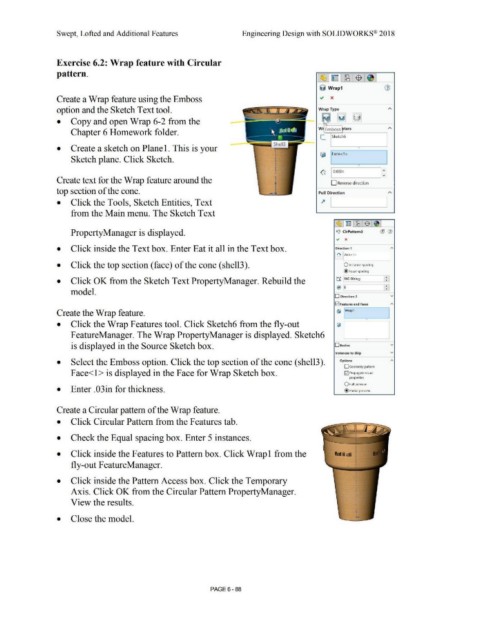
                                                Create a Wrap feature using the Emboss


                                                option and the Sketch Text tool.


                                                •           Copy and open Wrap 6-2 from the


                                                                                                                                                                                                                                                                          W  Emboss  ters
                                                            Chapter 6 Homework folder.

                                                                                                                                                                                                                                                                            [_  Sketch6


                                                •           Create a sketch on Plane 1. This is your


                                                                                                                                                                                                                                                                            (j;  1Face<1>
                                                            Sketch plane. Click Sketch.                                                                                                                                                                                                                                            I


                                                                                                                                                                                                                                                                                                            •

                                                                                                                                                                                                                                                                            ~  0.03in
                                                                                                                                                                                                                                                                                                                                v
                                                                                                                                                                                                                                                                                     1
                                                Create text for the Wrap feature around the                                                                                                                                                                                          D Reverse direction


                                                top section of the cone.                                                                                                                                                                                                   Pull Direction


                                                •           Click the Tools, Sketch Entities, Text                                                                                                                                                                           ~       L--1   -------'


                                                            from the Main menu. The Sketch Text


                                                                                                                                                                                                                                                                                          ~ l~ IW8 l$fel


                                                            PropertyManager is displayed.                                                                                                                                                                                                1>~<1  CirPattern3                   (11  (1)
                                                                                                                                                                                                                                                                                         .,      x


                                                •           Click inside the Text box. Enter Eat it all in the Text box.                                                                                                                                                                 Direction 1                                   "'


                                                                                                                                                                                                                                                                                          ~ l[Axis<1>
                                                                                                                                                                                                                                                                                                                                      I

                                                •           Click the top section (face) of the cone (shell3).                                                                                                                                                                                  O Instance spacing


                                                                                                                                                                                                                                                                                                @ Equal spacing


                                                                                                                                                                                                                                                                                                                                   •
                                                                                                                                                                                                                                                                                          t:l'.  i360.00deg
                                                •           Click OK from the Sketch Text PropertyManager. Rebuild the                                                                                                                                                                                                           :::I

                                                                                                                                                                                                                                                                                         *: '5                                   _!_I
                                                                                                                                                                                                                                                                                           ••
                                                                                                                                                                                                                                                                                                                                   •
                                                            model.
                                                                                                                                                                                                                                                                                        D  Direction 2                                 v


                                                                                                                                                                                                                                                                                        Iv! Features and Faces
                                                                                                                                                                                                                                                                                                                                       "'
                                                Create the Wrap feature.                                                                                                                                                                                                                  {li  IWrapl                                I


                                                                                                                                                                                                                                                                                                                  •
                                                •           Click the Wrap Features tool. Click Sketch6 from the fly-out                                                                                                                                                                  (iii


                                                            FeatureManager. The Wrap PropertyManager is displayed. Sketch6

                                                                                                                                                                                                                                                                                                                  •

                                                            is displayed in the Source Sketch box.                                                                                                                                                                                      Deodies                                        v


                                                                                                                                                                                                                                                                                         Instances to Skip                             v


                                                •           Select the Emboss option. Click the top section of the cone (shell3).                                                                                                                                                           Options                                    "'

                                                                                                                                                                                                                                                                                                D  Geometry pattern

                                                            Face<l > is displayed in the Face for Wrap Sketch box.                                                                                                                                                                              G2J Propagate visual

                                                                                                                                                                                                                                                                                                    properties


                                                                                                                                                                                                                                                                                                O Full preview
                                                •           Enter .03in for thickness.                                                                                                                                                                                                          @ Partial preview


                                                Create a Circular pattern of the Wrap feature.


                                                •           Click Circular Pattern from the Features tab.


                                                •           Check the Equal spacing box. Enter 5 instances.


                                                                                                                                                                                                                                                                                                          I

                                                •           Click inside the Features to Pattern box. Click Wrap! from the                                                                                                                                                              1a1,a1  I


                                                            fly-out FeatureManager.


                                                •           Click inside the Pattern Access box. Click the Temporary


                                                            Axis. Click OK from the Circular Pattern PropertyManager.


                                                            View the results.


                                                •           Close the model.


                                                                                                                                                                                PAGE6 - 88
   555   556   557   558   559   560   561   562   563   564   565