Page 555 - Subyek Computer Aided Design - [David Planchard] Engineering Design with SOLIDWORKS
P. 555
Engineering Design with SOLIDWORKS® 2018                                                                                                                                             Swept, Lofted and Additional Features


                                                                        969)  Click the Coarse box for Resolution.

                                                                                                                                                                                                                                                                                               ~ Edit  View  Insert  Tools  Window
                                                                                                                                                                                                                                                                                                 -_,,,-

                                                                                                                                                                                                                                                                                               [j New .. .
                                                                        Create the binary STL file.

                                                                                                                                                                                                                                                                                              ~ Open .. .
                                                                        970)  Click OK from the Export Options dialog box.

                                                                                                                                                                                                                                                                                                        Open Recent


                                                                        971)  Click Save from the Save dialog box. A status report is provided.                                                                                                                                                ~ Close


                                                                        972)  Click Yes.                                                                                                                                                                                                       ~ Make Drawing from Assembly


                                                                                                                                                                                                                                                                                               ~ Make Assembly from Assembly

                                                                        Publish an eDrawing and email the document to a colleague.

                                                                                                                                                                                                                                                                                               UjQ  Save


                                                                                                                                                                                                                                                                                              !!ii  Save As ...


                                                                        Create the eDrawing and animation.                                                                                                                                                                                    8  Save All


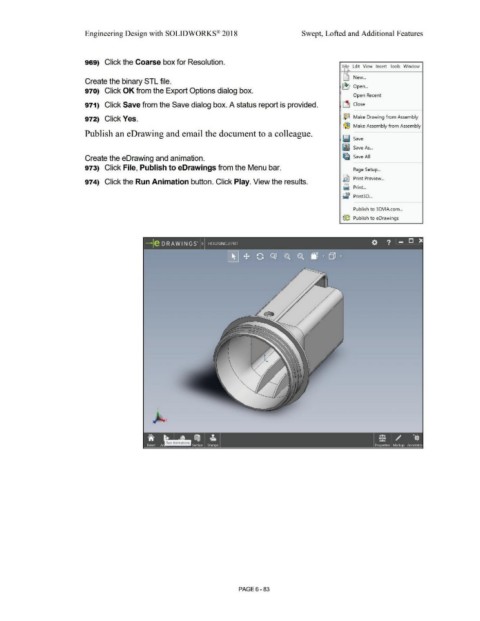
                                                                        973)  Click File, Publish to eDrawings from the Menu bar.                                                                                                                                                                       Page Setup  ...


                                                                                                                                                                                                                                                                                               Qi  Print Preview ...
                                                                        974)  Click the Run Animation button. Click Play. View the results.


                                                                                                                                                                                                                                                                                               ~ Print. ..


                                                                                                                                                                                                                                                                                               ~ Print3D ...


                                                                                                                                                                                                                                                                                                        Publish to 3DVIA.com ...


                                                                                                                                                                                                                                                                                               {e Publish to eDrawings


                                                                                                                          -le o RA w I NG s· 1»  HOUSING.EPRT                                                                                                                                                          O            ?  ~


                                                                                                                                                                                                                                                                                   ••


                                                                                                                                                                                                        PAGE6-83
   550   551   552   553   554   555   556   557   558   559   560