


Page 551 - Subyek Computer Aided Design - [David Planchard] Engineering Design with SOLIDWORKS
P. 551
Engineering Design with SOLIDWORKS® 2018                                                                                                                                             Swept, Lofted and Additional Features


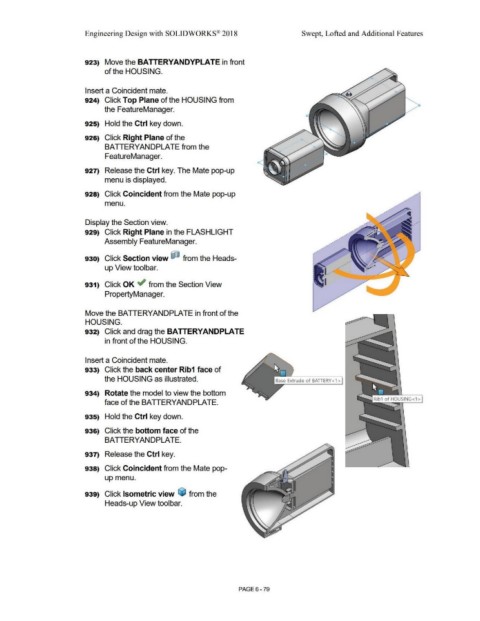
                                                                        923)  Move the BATTERYANDYPLA TE in front


                                                                                        of the HOUSING.


                                                                        Insert a Coincident mate.


                                                                        924)  Click Top Plane of the HOUSING from


                                                                                        the FeatureManager.


                                                                        925)  Hold the Ctrl key down.


                                                                        926)  Click Right Plane of the


                                                                                        BATTERYANDPLATE from the


                                                                                        FeatureManager.


                                                                        927)  Release the Ctrl key. The Mate pop-up


                                                                                        menu is displayed.


                                                                        928)  Click Coincident from the Mate pop-up


                                                                                        menu.


                                                                        Display the Section view.


                                                                        929)  Click Right Plane in the FLASHLIGHT


                                                                                        Assembly FeatureManager.


                                                                        930)  Click Section view  ,·                                                     from the Heads-


                                                                                        up View toolbar.


                                                                        931)  Click OK ,.; from the Section View


                                                                                        PropertyManager.


                                                                        Move the BATIERYANDPLATE in front of the


                                                                        HOUSING.


                                                                        932)  Click and drag the BA TTERYANDPLA TE


                                                                                        in front of the HOUSING.


                                                                        Insert a Coincident mate.


                                                                        933)  Click the back center Rib1 face of


                                                                                        the HOUSING as illustrated.


                                                                        934)  Rotate the model to view the bottom


                                                                                        face of the BATIERYANDPLATE.


                                                                        935)  Hold the Ctrl key down.


                                                                        936)  Click the bottom face of the


                                                                                        BATTERYANDPLATE.


                                                                        937)  Release the Ctrl key.


                                                                        938)  Click Coincident from the Mate pop-


                                                                                        up menu.


                                                                        939)  Click Isometric view  ~ from the


                                                                                        Heads-up View toolbar.


                                                                                                                                                                                                        PAGE6-79

