


Page 546 - Subyek Computer Aided Design - [David Planchard] Engineering Design with SOLIDWORKS
P. 546
Swept, Lofted and Additional Features                                                                                                                      Engineering Design with SOLIDWORKS® 2018


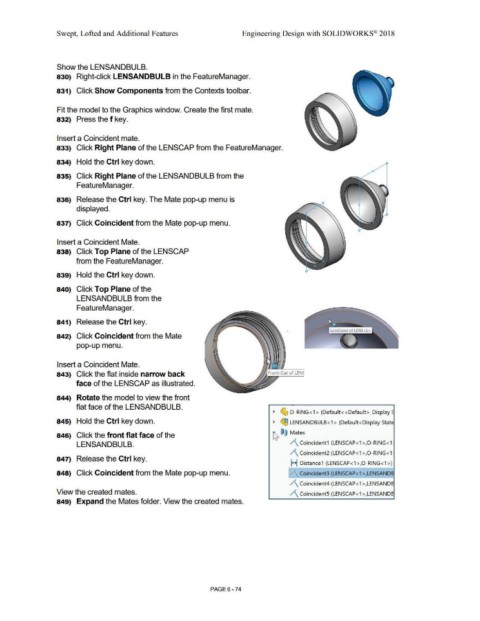
                                                Show the LENSANDBULB.


                                                830)  Right-click LENSANDBULB in the FeatureManager.


                                                831)  Click Show Components from the Contexts tool bar.


                                                Fit the model to the Graphics window. Create the first mate.


                                                832)  Press the f key.


                                                Insert a Coincident mate.


                                                833)  Click Right Plane of the LENSCAP from the FeatureManager.


                                                834)  Hold the Ctrl key down.


                                                835)  Click Right Plane of the LENSANDBULB from the


                                                                 FeatureManager.


                                                836)  Release the Ctrl key. The Mate pop-up menu is


                                                                 displayed.


                                                837)  Click Coincident from the Mate pop-up menu.


                                                Insert a Coincident Mate.


                                                838)  Click Top Plane of the LENSCAP


                                                                from the FeatureManager.


                                                839)  Hold the Ctrl key down.


                                                840)  Click Top Plane of the


                                                                 LENSANDBULB from the


                                                                 FeatureManager.


                                                841)  Release the Ctrl key.


                                                                                                                                                                                                                                                +
                                                842)  Click Coincident from the Mate


                                                                 pop-up menu.


                                                                                                                                                                                                                              •
                                                                                                                                                                                                                              •


                                                Insert a Coincident Mate.


                                                843)  Click the flat inside narrow back


                                                                face of the LENSCAP as illustrated.


                                                844)  Rotate the model to view the front


                                                                flat face of the LENSANDBULB.


                                                                                                                                                                                                                                     ~  ~ O-RING<1 >  (Default< <Default> _Display~


                                                845)  Hold the Ctrl key down.                                                                                                                                                        ~  (qJ LENSANDBULB <1 >  (Default<Display State


                                                846)  Click the front flat face of the                                                                                                                                              ~      ®@ Mates


                                                                 LENSANDBULB.                                                                                                                                                                      /\ Coincident1 (LENSCAP <1 >,0 -RING <1:


                                                                                                                                                                                                                                                   /\ Coincident2 (LENSCAP<1 >,0 -RING<1 :

                                                847)  Release the Ctrl key.
                                                                                                                                                                                                                                                   H Distance1  (LENSCAP<1 >,0-RING<1 >)


                                                848)  Click Coincident from the Mate pop-up menu.                                                                                                                                                !/\ Coincident3 (LENSCAP< 1 >,LENSAND~


                                                                                                                                                                                                                                                   /\ Coincident4 (LENSCAP<1 >,LENSANDB


                                                View the created mates.                                                                                                                                                                            /\ CoincidentS (LENSCAP<1 >,LENSANDB


                                                849)  Expand the Mates folder. View the created mates.


                                                                                                                                                                                PAGE6-74

