Page 547 - Subyek Computer Aided Design - [David Planchard] Engineering Design with SOLIDWORKS
P. 547
Engineering Design with SOLIDWORKS® 2018                                                                                                                                             Swept, Lofted and Additional Features


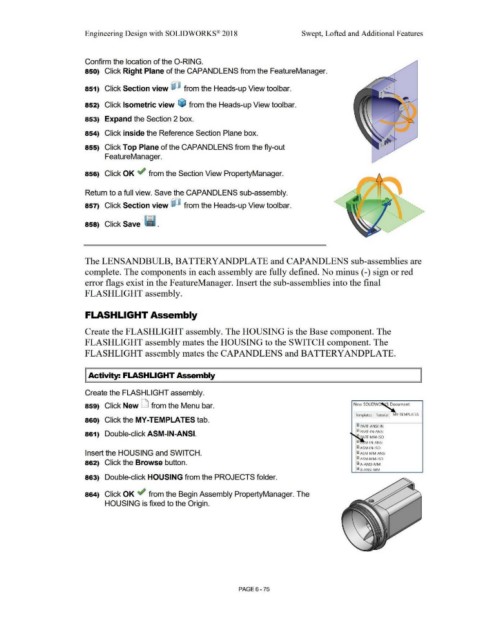
                                                                        Confirm the location of the 0-RING.


                                                                        850)  Click Right Plane of the CAPANDLENS from the FeatureManager.


                                                                                                                                                                                                                                                                                                                                          •
                                                                                                                                                                                                                                                                                                                                         • •
                                                                                                                                                                                                                                                                                                                                          •
                                                                                                                                                                                                                                                                                                                                          •
                                                                        851)  Click Section view ~ from the Heads-up View tool bar.                                                                                                                                                                                           "' ....   •   •
                                                                                                                                                                                                                                                                                                                                          •
                                                                                                                                                                                                                                                                                                                                   •
                                                                                                                                                                                                                                                                                                                                          :
                                                                                                                                                                                                                                                                                                                              .  .  ...          ..
                                                                                                                                                                                                                                                                                                                                          . ...........

                                                                        852)  Click Isometric view  ~ from the Heads-up View toolbar.


                                                                                                                                                                                                                                                                                                                                     .· ": ~ ·
                                                                                                                                                                                                                                                                                                                                   ••     •
                                                                                                                                                                                                                                                                                                                                          •
                                                                        853)  Expand the Section 2 box.                                                                                                                                                                                                                        •  • •     •
                                                                                                                                                                                                                                                                                                                          #  #  ,-        I
                                                                                                                                                                                                                                                                                                                                          1

                                                                        854)  Click inside the Reference Section Plane box.


                                                                                                                                                                                                                                                                                                                              .. ~        .
                                                                        855)  Click Top Plane of the CAPANDLENS from the fly-out                                                                                                                                                                                               •


                                                                                        FeatureManager.


                                                                        856)  Click OK ,.; from the Section View PropertyManager.


                                                                        Return to a full view. Save the CAPANDLENS sub-assembly.


                                                                                                                                                                                                                                                                                       •
                                                                        857)  Click Section view ~ from the Heads-up View toolbar.                                                                                                                                                       '


                                                                        858)  Click Save · ~ .


                                                                        The LENSANDBULB, BATTERYANDPLATE and CAPANDLENS sub-assemblies are


                                                                        complete. The components in each assembly are fully defined. No minus (-) sign or red


                                                                        error flags exist in the FeatureManager. Insert the sub-assemblies into the final


                                                                       FLASHLIGHT assembly.


                                                                        FLASHLIGHT Assembly


                                                                        Create the FLASHLIGHT assembly. The HOUSING is the Base component. The


                                                                        FLASHLIGHT assembly mates the HOUSING to the SWITCH component. The


                                                                        FLASHLIGHT assembly mates the CAPANDLENS and BATTERYANDPLATE.


                                                                        I Activity: FLASHLIGHT Assembly


                                                                        Create the FLASHLIGHT assembly.


                                                                        859)  Click New LJ  from the Menu bar.                                                                                                                                                                                          New SOLIDW~                        cument


                                                                                                                                                                                                                                                                                                          Templates  Tutorial  MY-TEMPLATES

                                                                        860)  Click the MY-TEMPLATES tab.

                                                                                                                                                                                                                                                                                                         r~ PART-ANSI-IN

                                                                        861)  Double-click ASM-IN-ANSI.                                                                                                                                                                                                  I~ PART-IN-ANSI

                                                                                                                                                                                                                                                                                                              P.  RT-MM-ISO

                                                                                                                                                                                                                                                                                                          @      M-IN-ANSI

                                                                                                                                                                                                                                                                                                          lg! ASM·IN·ISO
                                                                        Insert the HOUSING and SWITCH.                                                                                                                                                                                                    @) ASM·MM-ANSI

                                                                                                                                                                                                                                                                                                          iASM-MM-ISO
                                                                        862)  Click the Browse button.                                                                                                                                                                                                    Ii A-ANSI-MM


                                                                                                                                                                                                                                                                                                          Ii 8-ANSI-MM

                                                                        863)  Double-click HOUSING from the PROJECTS folder.


                                                                        864)  Click OK ,.; from the Begin Assembly PropertyManager. The


                                                                                        HOUSING is fixed to the Origin.


                                                                                                                                                                                                        PAGE6-75
   542   543   544   545   546   547   548   549   550   551   552