


Page 545 - Subyek Computer Aided Design - [David Planchard] Engineering Design with SOLIDWORKS
P. 545
Engineering Design with SOLIDWORKS® 2018 Swept, Lofted and Additional Features
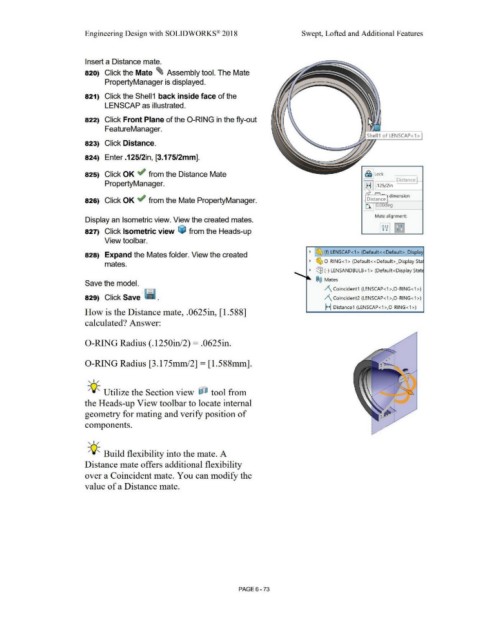
Insert a Distance mate.
820) Click the Mate ~ Assembly tool. The Mate
PropertyManager is displayed.
821) Click the Shell1 back inside face of the
LENSCAP as illustrated.
822) Click Front Plane of the 0-RING in the fly-out
FeatureManager.
Shell1 of LENSCAP<1 >
823) Click Distance.
824) Enter .125/2in, [3.175/2mm].
825) Click OK ~ from the Distance Mate l~llock
Distance
PropertyManager. .125/2inl
. · dimension
826) Click OK ~ from the Mate PropertyManager. D,stance
*)_ 0. 0 eg
Mate alignment:
Display an Isometric view. View the created mates.
827) Click Isometric view ~ from the Heads-up
View toolbar.
~ ~ (f) LENSCAP< 1 > (Default< <Default> _Display
828) Expand the Mates folder. View the created
~ ~ O-RING<1 > (Default<<Default >_Display Sta
mates.
~ ~ (-) LENSANDBULB <1 > (Default<Display Stat,
@@ Mates
Save the model.
/\ Coincident1 (LENSCAP<1 >,0 -RING <1>)
829) Click Save · lra. /\ Coincident2 (LENSCAP<1>,0 -RING<1>)
H Distance1 (LENSCAP<1 >,0-RING <1 >)
How is the Distance mate, .0625in, [1.588]
calculated? Answer:
0-RING Radius (.1250in/2) = .0625in.
.
•
•
•
0-RING Radius [3.175mm/2] = [l.588mm]. .. , .
. .,,.
'
. • l ........
:-
, 1 /
~
-;Q~ Utilize the Section view ~ tool from j ,· • •• •• .·: ~
•
•
j
•
1
the Heads-up View toolbar to locate internal
geometry for mating and verify position of
components.
, 1 /
-;Q~ Build flexibility into the mate. A
Distance mate offers additional flexibility
over a Coincident mate. You can modify the
value of a Distance mate.
PAGE6-73

