


Page 549 - Subyek Computer Aided Design - [David Planchard] Engineering Design with SOLIDWORKS
P. 549
Engineering Design with SOLIDWORKS® 2018                                                                                                                                             Swept, Lofted and Additional Features


                                                                        885)  Click OK ~ from the Distance Mate


                                                                                        PropertyManager.


                                                                        886)  Un-pin the Mate PropertyManager. Click the


                                                                                        Keep Visible  ,t icon.


                                                                        887)  Click OK if from the Mate


                                                                                        PropertyManager.


                                                                        Insert the CAPANDLENS assembly.


                                                                        888)  Click View, Hide/Show, un-check


                                                                                        Temporary Axis from the Menu bar.


                                                                        889)  Click Insert Components                                                                Elc®  from the


                                                                                        Assembly toolbar.


                                                                        890)  Click the Browse button.


                                                                        891)  Double-click CAPANDLENS from the


                                                                                        PROJECTS folder.


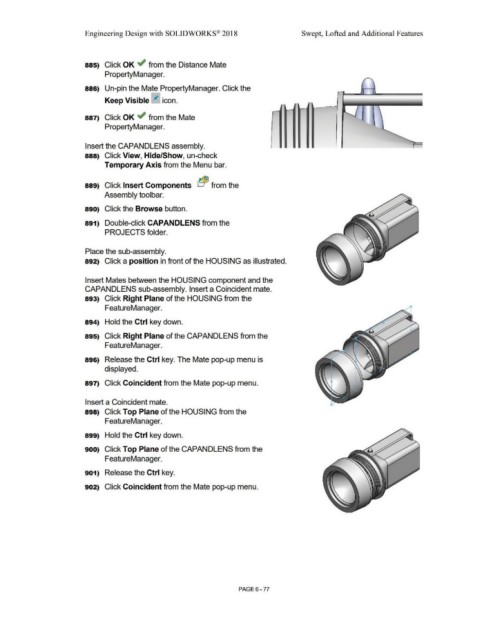
                                                                        Place the sub-assembly.


                                                                        892)  Click a position in front of the HOUSING as illustrated.


                                                                        Insert Mates between the HOUSING component and the


                                                                        CAPANDLENS sub-assembly. Insert a Coincident mate.


                                                                        893)  Click Right Plane of the HOUSING from the


                                                                                        FeatureManager.


                                                                        894)  Hold the Ctrl key down.


                                                                        895)  Click Right Plane of the CAPANDLENS from the


                                                                                        FeatureManager.


                                                                        896)  Release the Ctrl key. The Mate pop-up menu is


                                                                                        displayed.


                                                                        897)  Click Coincident from the Mate pop-up menu.


                                                                        Insert a Coincident mate.


                                                                        898)  Click Top Plane of the HOUSING from the


                                                                                        FeatureManager.


                                                                        899)  Hold the Ctrl key down.


                                                                        900)  Click Top Plane of the CAPANDLENS from the


                                                                                        FeatureManager.


                                                                        901)  Release the Ctrl key.


                                                                        902)  Click Coincident from the Mate pop-up menu.


                                                                                                                                                                                                        PAGE6-77

