


Page 542 - Subyek Computer Aided Design - [David Planchard] Engineering Design with SOLIDWORKS
P. 542
Swept, Lofted and Additional Features                                                                                                                      Engineering Design with SOLIDWORKS® 2018


                                                Insert the BA TIERYPLA TE part.


                                                764)  Click Insert Components rb~ from the Assembly toolbar.


                                                765)  Click the Browse button.


                                                766)  Double-click BA TTERYPLA TE from the PROJECTS folder.


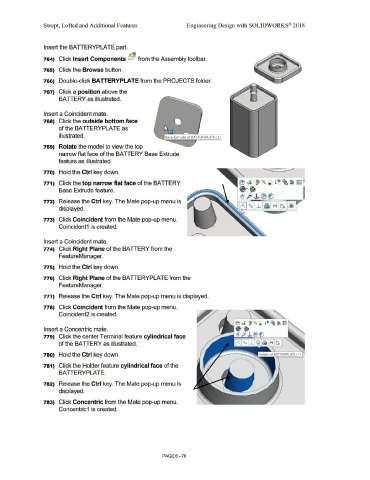
                                                767)  Click a position above the


                                                                 BA  TIERY as illustrated.


                                                Insert a Coincident mate.


                                                768)  Click the outside bottom face


                                                                 of the BA TIERYPLATE as


                                                                 illustrated.


                                                769)  Rotate the model to view the top


                                                                 narrow flat face of the BATTERY Base Extrude


                                                                feature as illustrated.


                                                770)  Hold the Ctrl key down.


                                                771)  Click the top narrow flat face of the BATIERY


                                                                 Base Extrude feature.


                                                772)  Release the Ctrl key. The Mate pop-up menu is


                                                                 displayed.


                                                773)  Click Coincident from the Mate pop-up menu.


                                                                 Coincident1  is created.


                                                Insert a Coincident mate.


                                                774)  Click Right Plane of the BA TIE RY from the


                                                                 FeatureManager.


                                                775)  Hold the Ctrl key down.


                                                776)  Click Right Plane of the BA TIERYPLATE from the


                                                                 FeatureManager.


                                                777)  Release the Ctrl key. The Mate pop-up menu is displayed.


                                                778)  Click Coincident from the Mate pop-up menu.


                                                                Coincident2 is created.


                                                Insert a Concentric mate.


                                                779)  Click the center Terminal feature cylindrical face


                                                                 of the BA TIERY as illustrated.


                                                780)  Hold the Ctrl key down.


                                                781)  Click the Holder feature cylindrical face of the


                                                                 BATTERYPLA  TE.


                                                782)  Release the Ctrl key. The Mate pop-up menu is


                                                                 displayed.


                                                783)  Click Concentric from the Mate pop-up menu.


                                                                Concentric1  is created.


                                                                                                                                                                                PAGE 6 - 70

