Page 539 - Subyek Computer Aided Design - [David Planchard] Engineering Design with SOLIDWORKS
P. 539
Engineering Design with SOLIDWORKS® 2018                                                                                                                                             Swept, Lofted and Additional Features


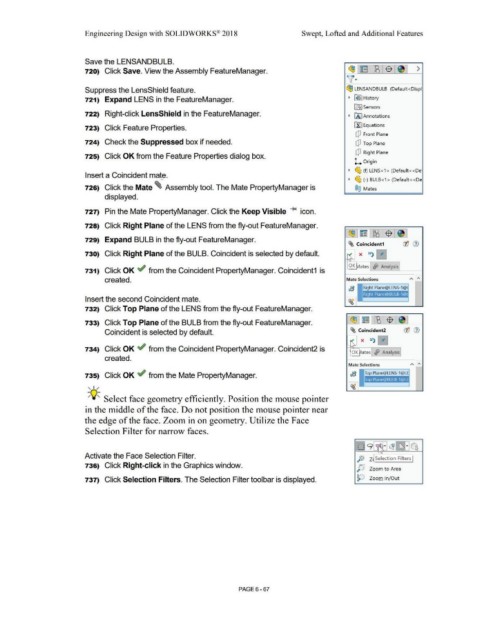
                                                                        Save the LENSANDBULB.


                                                                        720)  Click Save. View the Assembly FeatureManager.                                                                                                                                                                        ~,~ 1~1$ ;~1 >


                                                                                                                                                                                                                                                                                                  'fl·


                                                                        Suppress the LensShield feature.                                                                                                                                                                                          c:!fJ  LEN SAN DBULB  (Def au It < Dis pl


                                                                       121)  Expand LENS in the FeatureManager.                                                                                                                                                                                     ~  I}!) I History


                                                                                                                                                                                                                                                                                                         lftJ Sensors

                                                                        722)  Right-click LensShield in the FeatureManager.                                                                                                                                                                         ~  IA] Annotations


                                                                        723)  Click Feature Properties.                                                                                                                                                                                                 [l:J Equations


                                                                                                                                                                                                                                                                                                          dJ  Front Plane

                                                                        724)  Check the Suppressed box if needed.                                                                                                                                                                                         dJ  Top Plane


                                                                                                                                                                                                                                                                                                          dJ  Right Plane
                                                                        725)  Click OK from the Feature Properties dialog box.

                                                                                                                                                                                                                                                                                                         L  Origin


                                                                                                                                                                                                                                                                                                    ~  ~ (f) LENS<1 >  (Default < <De·
                                                                        Insert a Coincident mate.                                                                                                                                                                                                   ~  ~ (-) BULB<1 > (Default < <De
                                                                                                                                       ..


                                                                        726)  Click the Mate ~  Assembly tool. The Mate PropertyManager is                                                                                                                                                               ®@  Mates


                                                                                        displayed.


                                                                        727)  Pin the Mate PropertyManager. Click the Keep Visible  _...  icon.


                                                                        728)  Click Right Plane of the LENS from the fly-out FeatureManager.


                                                                        729)  Expand BULB in the fly-out FeatureManager.

                                                                                                                                                                                                                                                                                                   ~ Coincident1                                 ®  (J)


                                                                        730)  Click Right Plane of the BULB. Coincident is selected by default.                                                                                                                                                             x  ~0


                                                                                                                                                                                                                                                                                                    OK  ates  !fa  Analysis
                                                                        731)  Click OK ~ from the Coincident PropertyManager. Coincident1  is


                                                                                        created.                                                                                                                                                                                                  Mate Selections                                     A      "


                                                                                                                                                                                                                                                                                                   @!           Right Plane@LENS-1@


                                                                        Insert the second Coincident mate.                                                                                                                                                                                       I~ I


                                                                        732)  Click Top Plane of the LENS from the fly-out FeatureManager.                                                                                                                                                      ...__,__ _____ __.


                                                                        733)  Click Top Plane of the BULB from the fly-out FeatureManager.


                                                                                        Coincident is selected by default.                                                                                                                                                                           ~ Coincident2                                ®  (1)


                                                                        734)  Click OK ~ from the Coincident PropertyManager. Coincident2 is

                                                                                                                                                                                                                                                                                                      OK  ates l <fji  Analysis j
                                                                                        created.


                                                                                                                                                                                                                                                                                                    Mate Selections                                    A      "


                                                                        735)  Click OK ..; from the Mate PropertyManager.


                                                                          , ,/                                                                                                                                                                                                                     1~1


                                                                          -;(J~ Select face geometry efficiently. Position the mouse pointer                                                                                                                                                      ....._ _______ _


                                                                        in the middle of the face. Do not position the mouse pointer near


                                                                        the edge of the face. Zoom in on geometry. Utilize the Face


                                                                        Selection Filter for narrow faces.


                                                                                                                                                                                                                                                                                                           .  .    9      l   •   •   ~lliE]Q
                                                                                                                                                                                                                                                                                                           .  .
                                                                                                                                                                                                                                                                                                            ······
                                                                                                                                                                                                                                                                                                           .  .
                                                                                                                                                                                                                                                                                                           .  .
                                                                                                                                                                                                                                                                                                                              •
                                                                                                                                                                                                                                                                                                           ......
                                                                                                                                                                                                                                                                                                                              '
                                                                       Activate the Face Selection Filter.                                                                                                                                                                                                 p  zJ Selection Filters I


                                                                        736)  Click Right-click in the Graphics window.                                                                                                                                                                                   j5]        ZQom to Area


                                                                        737)  Click Selection Filters. The Selection Filter toolbar is displayed.                                                                                                                                                          ~
                                                                                                                                                                                                                                                                                                                     Zoom In/ Out


                                                                                                                                                                                                        PAGE6-67
   534   535   536   537   538   539   540   541   542   543   544