


Page 534 - Subyek Computer Aided Design - [David Planchard] Engineering Design with SOLIDWORKS
P. 534
Swept, Lofted and Additional Features Engineering Design with SOLIDWORKS® 2018
)$1'·~ ~
":,., Review of the HOUSING Part
• IA] Annotations "
The HOUSING utilized the Extruded Boss/Base feature with the Draft ~ Equations
o-
g:::o Material <not specified>
Angle option. The Lofted Boss feature was created to blend the CJ Front Plane -
circular face of the LENS with the rectangular face of the BATTERY. CJ Top Plane
CJ Right Plane
The Shell feature removed material with a constant wall thickness. The L Origin
Draft feature utilized the front face as the Neutral plane. • ~ Base Extrude
CJ BatteryLoftPlane
You created a Thread similar to the LENSCAP Thread. The Thread • ~ Boss-Loft1
• ~ Boss-Battery
profile was copied from the LENSCAP and inserted into the Top Plane (B Shelll
of the HOUSING. The Extruded Cut feature was utilized to create a • ~ Boss·Stop
~ Oraft1
hole for the Switch. The Rib features were utilized in a Linear Pattern CJ ThreadPlane
• ~ ThreadPath
and Mirror feature.
• ~ Thread
• .J° Handle
Each feature has additional options that are applied to create different • ~ SwitchHole
geometry. The Offset From Surface option creates an Extruded Cut on • ~ Rib1
tg LPatternl
the curved surface of the HOUSING and LENSCAP. The Reverse CJ LongRibPlane
offset and Translate surface options produce a cut depth constant • ~ Rib2
~ Mirror1
throughout the curved surface.
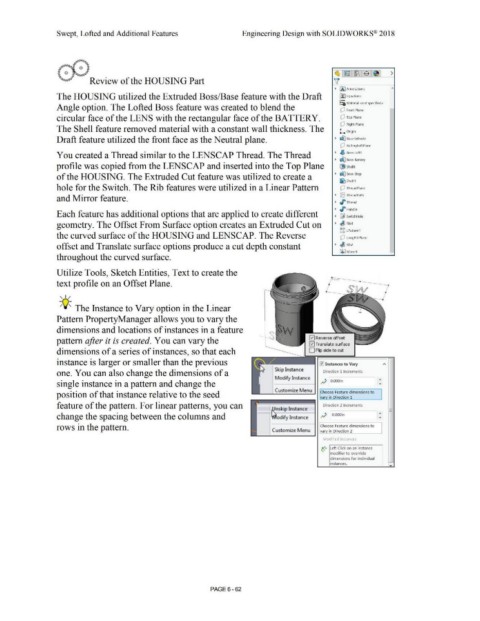
Utilize Tools, Sketch Entities, Text to create the
lane
text profile on an Offset Plane.
, 1 /
-;Q~ The Instance to Vary option in the Linear
Pattern PropertyManager allows you to vary the
dimensions and locations of instances in a feature
pattern after it is created. You can vary the ~ Reverse offset
l"""I Translate surface ...._,,,.,,,
dimensions of a series of instances, so that each O Flip side to cut
instance is larger or smaller than the previous ~ Instances to Vary A
Skip Instance
one. You can also change the dimensions of a Direction 1 Increments
Modify Instance
single instance in a pattern and change the .if O.OOOin
_ _,_C_u_sto_m_iz_e M_ e_nu__. Choose Feature dimensions to
position of that instance relative to the seed varv in Direction 1
feature of the pattern. For linear patterns, you can nskip Instance Direction 2 Increments -
-
--H -
change the spacing between the columns and odify Instance .if O.OOOin
rows in the pattern. Choose Feature dimensions to
Customize Menu
_____ ____, vary in Direction 2
Modified Instances
.. :• Left Click on an instance
• modifier to override
dimensions for individual
instances.
PAGE6 - 62

