


Page 532 - Subyek Computer Aided Design - [David Planchard] Engineering Design with SOLIDWORKS
P. 532
Swept, Lofted and Additional Features Engineering Design with SOLIDWORKS® 2018
Insert the Rib feature.
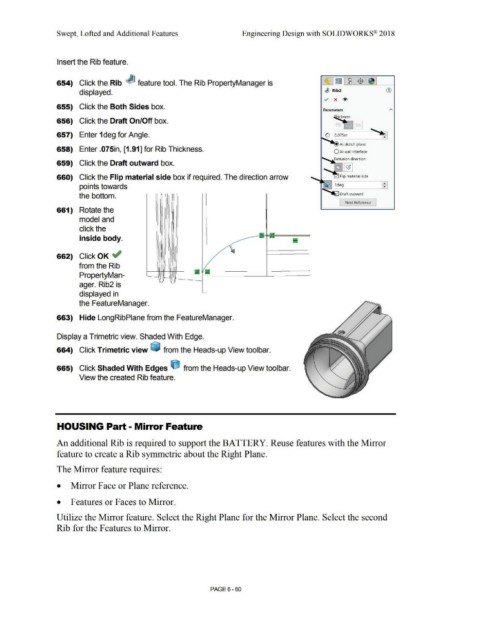
654) Click the Rib ~ feature tool. The Rib PropertyManager is ~ ~ ~ $ ~
displayed. ~ Rib2 G)
v x <!>
655) Click the Both Sides box.
Parameters
ickness:
656) Click the Draft On/Off box. ~
= = §J
657) Enter 1deg for Angle. ,,__ ~
0, ~ .075in
At sketch plane
658) Enter .075in, [1.91] for Rib Thickness. O At wall interface
ll""'loo,,,._ Extrusion direction:
659) Click the Draft outward box.
660) Click the Flip material side box if required. The direction arrow
points towards
the bottom.
Next Reference
661) Rotate the
model and
click the
inside body.
662) Click OK ~
from the Rib
PropertyMan-
ager. Rib2 is
displayed in
the FeatureManager.
663) Hide LongRibPlane from the FeatureManager.
Display a Trimetric view. Shaded With Edge.
664) Click Trimetric view ~ from the Heads-up View toolbar.
665) Click Shaded With Edges ijJ from the Heads-up View toolbar.
View the created Rib feature.
HOUSING Part - Mirror Feature
An additional Rib is required to support the BATTERY. Reuse features with the Mirror
feature to create a Rib symmetric about the Right Plane.
The Mirror feature requires:
• Mirror Face or Plane reference.
• Features or Faces to Mirror.
Utilize the Mirror feature. Select the Right Plane for the Mirror Plane. Select the second
Rib for the Features to Mirror.
PAGE6 - 60

