


Page 537 - Subyek Computer Aided Design - [David Planchard] Engineering Design with SOLIDWORKS
P. 537
Engineering Design with SOLIDWORKS® 2018 Swept, Lofted and Additional Features
I Activity: Create two Assembly Templates
Create an Assembly Template.
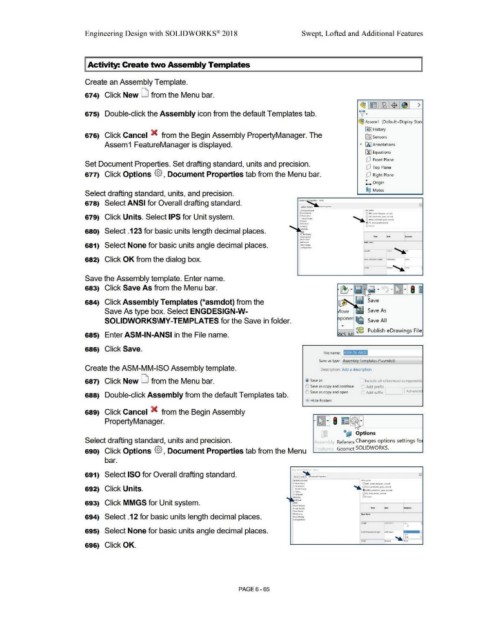
674) Click New LJ from the Menu bar.
(931~ :~1$ 1~1 >
)[·
675) Double-click the Assembly icon from the default Templates tab. ,_
(93 Assem1 (Default<Display StatE
~ I History
676) Click Cancel X from the Begin Assembly PropertyManager. The iITl Sensors
Assem1 FeatureManager is displayed. • 00 Annotations
u:) Equations
[P Front Plane
Set Document Properties. Set drafting standard, units and precision.
[P Top Plane
677) Click Options {§} , Document Properties tab from the Menu bar. [P Right Plane
L Origin
O@ Mates
Select drafting standard, units, and precision.
678) Select ANSI for Overall drafting standard. Ootumeii~ n:i · Ur,~
9,/ffl:111 Opcloffl ~ -,oem ,,..,.-i ... ,
l.'Alw9~d ......... ffl
• f.nnOUliorls O Ml.~ ~, .... bog.-- ;w,"_,,_.
679) Click Units. Select IPS for Unit system. • Olmom.~ .............. _... QCGS (t..-Alo!w!Of, !;t olffl wcM4
.......
\/i1:M!~
~ QMMG.'\ (f'lli!{n,,,,tn. 9'M\ '«~
® 1rs !int'\pounct.sKOnlU
O<u"1c.
-
680) Select .123 for basic units length decimal places.
~ ·- .\....W .....
VMdmcc,r-
681) Select None for basic units angle decimal places. ,,,_°"""'
C..011111).U~
682) Click OK from the dialog box.
Save the Assembly template. Enter name.
683) Click Save As from the Menu bar.
684) Click Assembly Templates (*asmdot) from the ~el Save
Save As type box. Select ENGDESIGN-W- ove Save As
SOLIDWORKS\MY-TEMPLATES for the Save in folder. pone] lflf& Save All
• {~ Publish eDrawings File
685) Enter ASM-IN-ANSI in the File name.
686) Click Save.
File name: ASM-IN-ANSI
Save as type: Assembly Templates (*.asmdot)
Create the ASM-MM-ISO Assembly template. Description: Add a description
687) Click New LJ from the Menu bar. @) Save as [ Include all referenced components
~J Save as copy and continue J Add prefix
(S) Save as copy and open ~, Add suffix l Advance
688) Double-click Assembly from the default Templates tab.
• Hide Folders
689) Click Cancel X from the Begin Assembly
~"
~
PropertyManager. rr[Iill I E 't.; •
'
~ ,_
-
,n @.t, '
\,_, ..... Options
'
Select drafting standard, units and precision. Assernb .; Referen Changes options settings fo
F Pature., Geo me' SOLIDWORKS.
690) Click Options {§} , Document Properties tab from the Menu
bar.
691) Select ISO for Overall drafting standard.
Ou!IRJ~•ndard \Mllf,)1,':Q111
•A~IIS J 0Md Pl'ttf, klog.tfl\ a,tt0ndJ
• Ott~o"
692) Click Units. ·- Qcc;s t<C!f,tfllttfl. ~ !«Olldl
Vlf1Wf~
@ MMGS {ffift,mt1•, iftMn, C4<on4
0 1P\ \Intl\ p(llll'ICI. W<ffil
. ... Ocu~•
693) Click MMGS for Unit system. ...... """..,
111-..11 Qi..Jly
~ llkwl
Wcl:lrrofflb
694) Select .12 for basic units length decimal places. l'ltr.e ()tSplJy
.......
~u,lllllom
695) Select None for basic units angle decimal places.
696) Click OK.
PAGE6-65

