


Page 556 - Subyek Computer Aided Design - [David Planchard] Engineering Design with SOLIDWORKS
P. 556
Swept, Lofted and Additional Features                                                                                                                      Engineering Design with SOLIDWORKS® 2018


                                                Stop the animation.


                                                975)  Click the Stop button. Click the Reset button to return to the original position.


                                                Save the eDrawing.


                                                976)  Click Save from the eDrawing Main menu.


                                                977)  Select the PROJECTS folder.


                                                978)  Enter HOUSING for File name.


                                                979)  Click Save.


                                                980)  Close                                  the eDrawing dialog box.


                                                981)  Close all models in the session.


                                                It is time to go home. The


                                                telephone rings. The customer


                                                is ready to place the order.


                                                Tomorrow you will receive the


                                                purchase order.


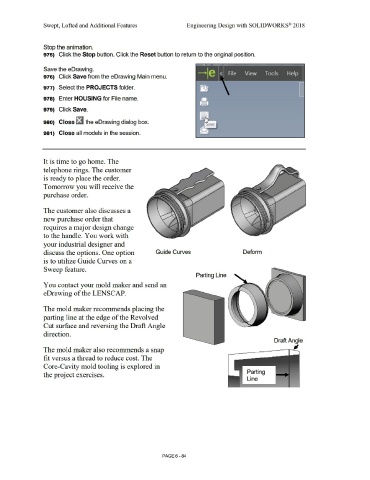
                                                The customer also discusses a


                                                new purchase order that


                                                requires a major design change


                                                to the handle. You work with


                                                your industrial designer and


                                                discuss the options. One option                                                                                          Guide Curves                                                                                  Deform


                                                is to utilize Guide Curves on a


                                                Sweep feature.


                                                                                                                                                                                                                     Parting Line


                                                You contact your mold maker and send an


                                                eDrawing of the LENSCAP.


                                                The mold maker recommends placing the


                                                parting line at the edge of the Revolved


                                                Cut surface and reversing the Draft Angle


                                                direction.


                                                                                                                                                                                                                                                                                                         Draft Angle


                                                                                                                                                                                                                                                                                                                              JI
                                                The mold maker also recommends a snap


                                                fit versus a thread to reduce cost. The


                                                Core-Cavity mold tooling is explored in


                                                                                                                                                                                                                                                                            Parting
                                                the project exercises.

                                                                                                                                                                                                                                                                            Line


                                                                                                                                                                                PAGE6-84

