


Page 564 - Subyek Computer Aided Design - [David Planchard] Engineering Design with SOLIDWORKS
P. 564
Swept, Lofted and Additional Features Engineering Design with SOLIDWORKS® 2018
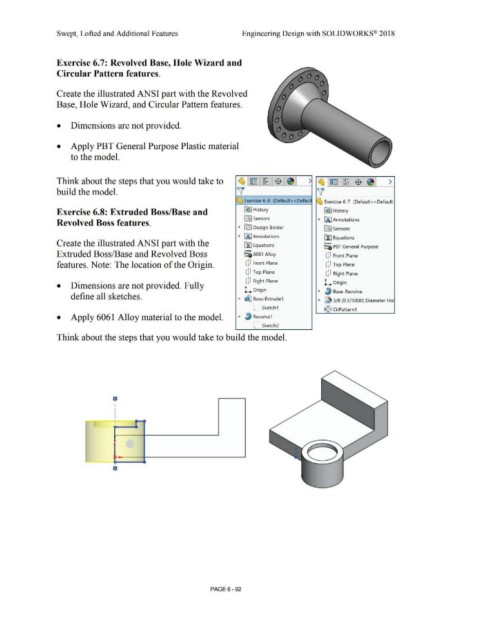
Exercise 6.7: Revolved Base, Hole Wizard and
Circular Pattern features.
Create the illustrated ANSI part with the Revolved
Base, Hole Wizard, and Circular Pattern features.
• Dimensions are not provided.
• Apply PBT General Purpose Plastic material
to the model.
Think about the steps that you would take to ~l~ llM J$ J~ I ' ~ ~ [M $ ~ >
build the model. \( v'
~ Exercise 6-8 (Default< <Defaul ~ ' Exercise 6-7 (Default<< Default:
Exercise 6.8: Extruded Boss/Base and G!> I History R!> I History
In] Sensors • U(J Annotations
Revolved Boss features.
• rtil Design Binder [0] Sensors
• IA] Annotations r~ J Equations
Create the illustrated ANSI part with the ~ Equations o-
::e PBT General Purpose
o-
Extruded Boss/Base and Revolved Boss ~:i; 6061 Alloy dJ Front Plane
features. Note: The location of the Origin. dJ Front Plane dJ Top Plane
Q Top Plane
dJ Right Plane
dJ Right Plane L Origin
• Dimensions are not provided. Fully
L Origin • ~ Base-Revolve
define all sketches.
• tSj') Boss-Extrude1
• ~ 3/ 8 (0.375000) Diameter Hol
C_ sketch1
1,~<J CirPattern1
• Apply 6061 Alloy material to the model. • ~ Revolve1
C_ sketch2
Think about the steps that you would take to build the model.
a
i
I
I L _-.·. - c.
(
,
. '
a
PAGE6 - 92

