Page 629 - Subyek Computer Aided Design - [David Planchard] Engineering Design with SOLIDWORKS
P. 629
Engineering Design with SOLIDWORKS® 2018                                                                                                                                                          Top-Down and Sheet Metal Parts


                                                                        Suppress the Vent Extruded Cut feature.


                                                                       438) Right-click Vent from the FeatureManager.


                                                                        439) Click Suppress  l '° from the Context toolbar.


                                                                        The NO-VENT Configuration contains the suppressed Vent


                                                                        Extruded Cut feature. A Flat Pattern exists for the


                                                                        Default Configuration. The Flat Pattern Configuration


                                                                        is called a Derived Configuration.


                                                                        Create a Flat Pattern Derived Configuration for the


                                                                       NO-VENT configuration. Un-suppress the Flat Pattern


                                                                        feature.


                                                                        Create a Derived Configuration.


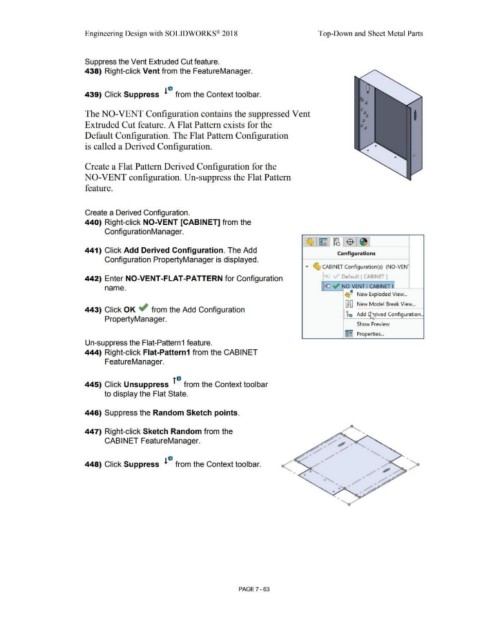
                                                                       440) Right-click NO-VENT [CABINET] from the


                                                                                        Configuration Manager.


                                                                                                                                                                                                                                                              ·~ ~ ]~ !$ 1~ ]


                                                                       441) Click Add Derived Configuration. The Add
                                                                                                                                                                                                                                                                                          Configurations

                                                                                        Configuration PropertyManager is displayed.

                                                                                                                                                                                                                                                                ....   ~ CABINET Configuration(s)  (NO-VEN-


                                                                        442) Enter NO-VENT-FLAT -PATTERN for Configuration                                                                                                                                                    ~               Default [CABINET]


                                                                                        name.                                                                                                                                                                                 ~ .,, NO-V_ENJ I CABINET l


                                                                                                                                                                                                                                                                                                 <!!iJ'  New Exploded View ...


                                                                                                                                                                                                                                                                                                 GB New Model Break View ...

                                                                        443) Click OK ~ from the Add Configuration
                                                                                                                                                                                                                                                                                                 ic        Add [ ~ rived Configuration ..
                                                                                                                                                                                                                                                                                                                       ..
                                                                                        PropertyManager.

                                                                                                                                                                                                                                                                                                           Show Preview


                                                                                                                                                                                                                                                                                                 l!~.EJ  Properties ...


                                                                        Un-suppress the Flat-Pattern 1 feature.


                                                                        444) Right-click Flat-Pattern1 from the CABINET


                                                                                        FeatureManager.


                                                                       445) Click Unsuppress  1°  from the Context toolbar


                                                                                        to display the Flat State.


                                                                        446) Suppress the Random Sketch points.


                                                                       447) Right-click Sketch Random from the
                                                                                                                                                                                                                                                                                                               '

                                                                                        CABINET FeatureManager.


                                                                                                                                                                                                                                                                                                                               ...

                                                                                                                                                                                                                                                                                                                                                      >
                                                                       448) Click Suppress  l '° from the Context toolbar.


                                                                                                                                                                                                                                                                                                               ,,


                                                                                                                                                                                                                                                                                                        /


                                                                                                                                                                                                        PAGE 7 - 63
   624   625   626   627   628   629   630   631   632   633   634