Page 628 - Subyek Computer Aided Design - [David Planchard] Engineering Design with SOLIDWORKS
P. 628
Top-Down and Sheet Metal Parts                                                                                                                             Engineering Design with SOLIDWORKS® 2018


                                                The Sketch Driven Pattern is complete. Suppress the patterns


                                                when not required for future model development.


                                                Utilize the Suppress option with configurations to save the


                                                formed and flat state of the CABINET.


                                                CABINET-Formed and Flat States


                                                How do you control the 30 formed state in the assembly and


                                                the 2D flat state in the drawing? Answer: Utilize


                                                configurations. A configuration is a variation of a part or


                                                assembly within a single document.  Variations include


                                                different dimensions, features, and properties.


                                                The BOX assembly requires the CABINET in the 30 formed


                                                state. Utilize the Default Configuration in the assembly.


                                                The CABINET drawing requires the 2D flat state. The drawing requires a view with the


                                                Linear Pattern of square cuts and the random sketch pattern suppressed. Create a new


                                                configuration named NO-VENT. Suppress the patterns. Create a Derived configuration


                                                named NO-VENT-FLAT. Un-suppress the Flat Pattern feature to maintain the CABINET


                                                in its flat state. Create two configurations in the 3D formed and 2D flat state.


                                                I Activity: CABINET-Fonned and Flat States


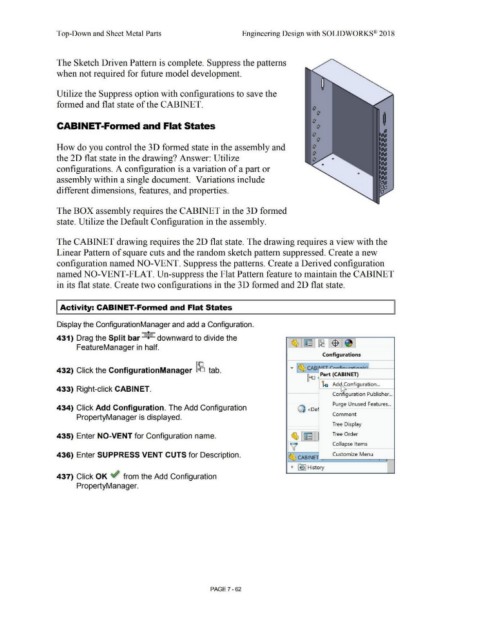
                                                Display the ConfigurationManager and add a Configuration.


                                                                                                                           +      a
                                                431) Drag the Split bar · +  downward to divide the


                                                                 FeatureManager in half.


                                                                                                                                                                                                                                                                              Configurations


                                                                                                                                                                                                                                                   .....  ~ CABI ,u;_-r..c;;.,,..,,:;,. .. ~,.ti                ,  , I
                                                432) Click the ConfigurationManager ~ tab.
                                                                                                                                                                                                                                                                 ~ . Part (CABINET)


                                                                                                                                                                                                                                                                             ic  Adi "Configuration ...
                                                433) Right-click CABINET.

                                                                                                                                                                                                                                                                                      Configuration Publisher .. .


                                                                                                                                                                                                                                                                                       Purge Unused Features  .. .
                                                434) Click Add Configuration. The Add Configuration                                                                                                                                                      Q <oe ·


                                                                                                                                                                                                                                                                                      Comment
                                                                 PropertyManager is displayed.


                                                                                                                                                                                                                                                                                      Tree  Display


                                                435) Enter NO-VENT for Configuration name.                                                                                                                                                          ~ ~                               Tree Order
                                                                                                                                                                                                                                                   V                                  Collapse Items


                                                436) Enter SUPPRESS VENT CUTS for Description.                                                                                                                                                    ~ CABINtn ___ c_u_sto_m_iz_e _M_en_u _ r--r. , --1


                                                                                                                                                                                                                                                I ~  ~ I History
                                                                                                                                                                                                                                                                                                                                    I

                                                437) Click OK ~ from the Add Configuration


                                                                 PropertyManager.


                                                                                                                                                                                PAGE? - 62
   623   624   625   626   627   628   629   630   631   632   633